47
OPERATING INSTRUCTIONS
AQUATIC MELODIES
®
SURROUND SOUND SYSTEM
(Available only on the
Elation and Aspire
)
The Elation & Aspire comes equipped with the Aquatic Melodies Surround Sound system. The system includes the following:
• Sony
®
CD AM/FM Stereo with equalizer.
• Three Pop-Up Satelite Speakers.
• Speakers are strategically positioned to create surround sound.
• Left and right speakers provide true stereo sound, while the center (or rear) speaker plays the dif
fer
ence
in sound between the left and right speaker
(similar to a home theater surround sound system).
• To increase rear speaker volume, conduct the following:
- Press “SEL” button to advance to “FAD” (fader), press the “+” or “-” on the left to shift fader halfway to the rear of the spa.
- Press “SEL” button to advance to LOW, MID, HI frequency range selection.
- Press the “+” or “-” on the left to adjust LOW, MID, or HI frequencies.
NOTE: Because of this feature, the rear speaker will produce no sound if there is no difference in the sound being delivered to the right and left speakers.
• Subwoofer with independent amplifier.
The operating instructions for the CD AM/FM Stereo have been included in the spa’s Owner’s Packet.
SPEAKER OPERATION
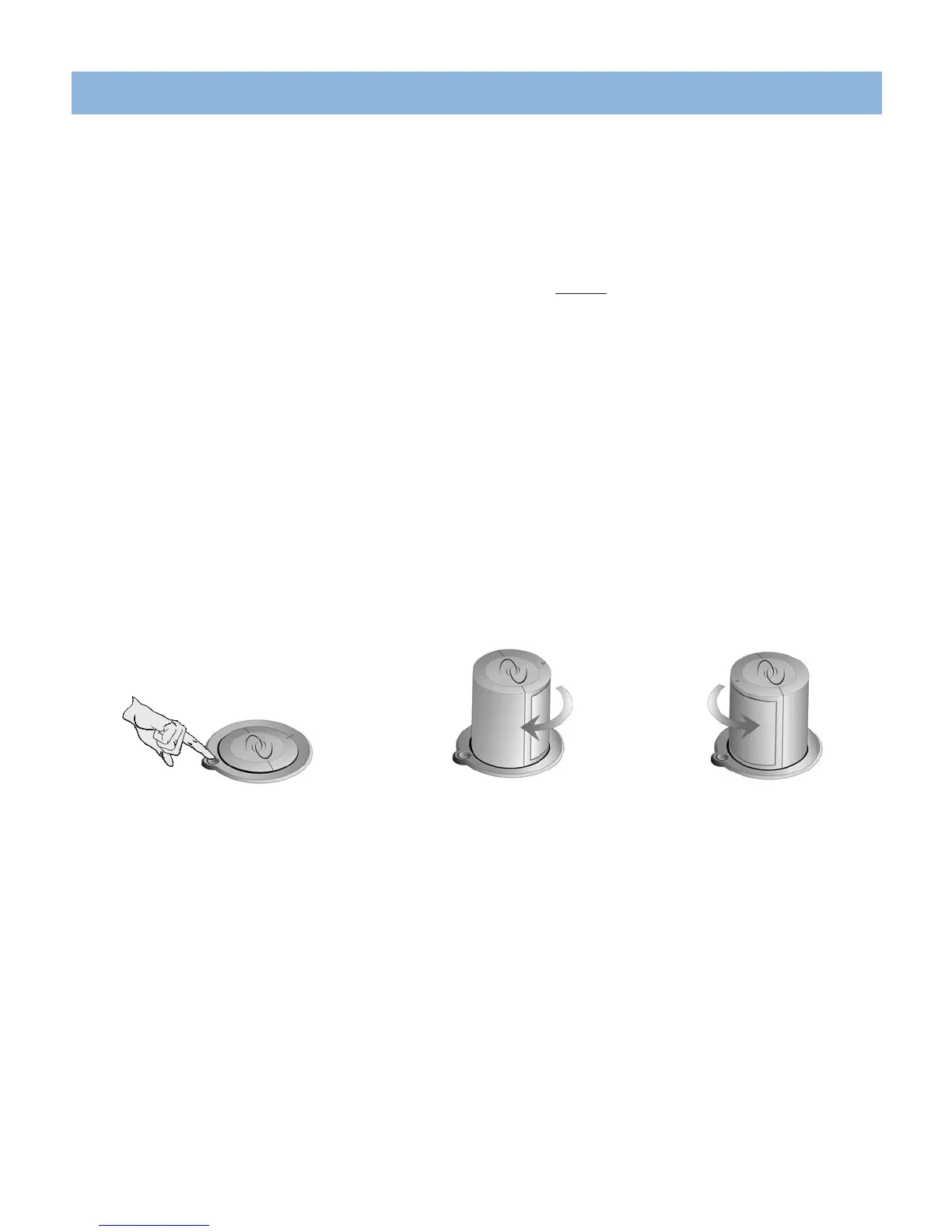
To operate the pop-up speakers:
1. Press the button next to the speaker.
2. Rotate the speaker to the desired position (the speaker can rotate in either direction until it stops).
3. The pop-up speaker will lower in any position. To lower, rotate the speaker, and press down on the top of the speaker until it locks into position.
NOTE: Radio reception will vary depending on your location.
Press button to raise the speaker
Speaker in initial raised position.
Rotate speaker to desired location.



 To Next Page