EasyManua.ls Logo

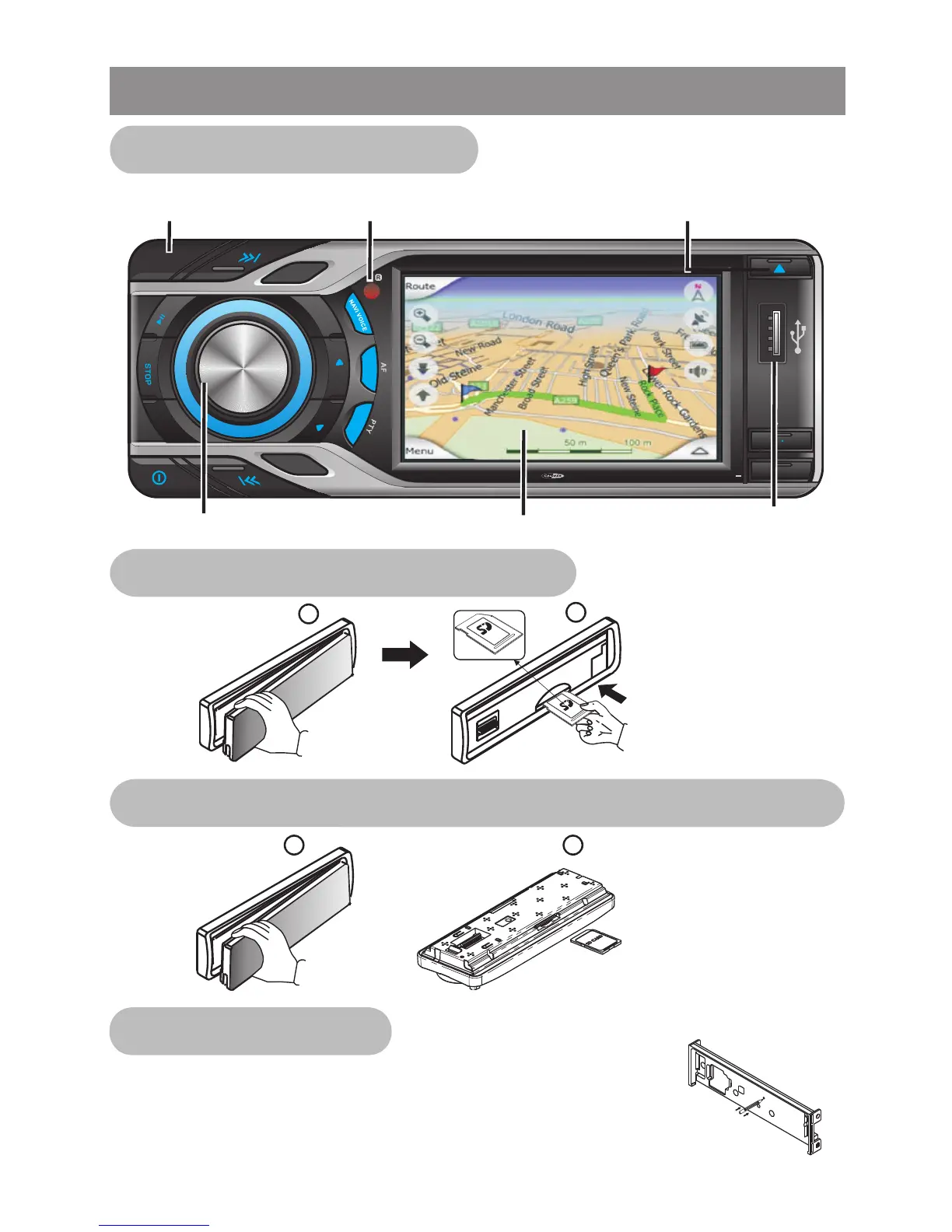
Caliber MCD795 - Overview the Unit; Resetting the Unit

Caliber MCD795
77 pages
Print Icon
To Next Page IconTo Next Page
To Previous Page IconTo Previous Page
Loading...
S
U
BW
LOUD
1
2
3
4
5
6
OSD SET UP
T
RP
RDM
AS PS
LRE
MODE
B
ND
A
MUTE
GPS MODE
TA
4x 75WATTMC D 795
Panel
Release
IR Receiv er
Volume Knob
USB
Touch Screen Display
Eject / Open
Panel Angle adjust
Face
Up
Insert the Memory
Card with Label up
side into the SD
Card slot on main unit
1
2
Detach the
Front Panel
1 2
R
S
T
E
E
Insert the Memory
Card with Label up
side into the SD Card
slot behind the front
panel
Overview the Unit
After releasing the front panel, use a pencil or any
non-metalic object to press & hold the reset button
for five seconds to reset the unit.
Front panel main control
SD Card slot for MEDIA PLAYER
SD Card slot for DIGITAL MAP or SOFTWARE UPGRADE
Resetting the unit
Detach the
Front Panel

Other manuals for Caliber MCD795

Related product manuals