27
1002595 ISSUE 5 M172 VARIHEAT
Insert e correct information, data
shown here is an example.
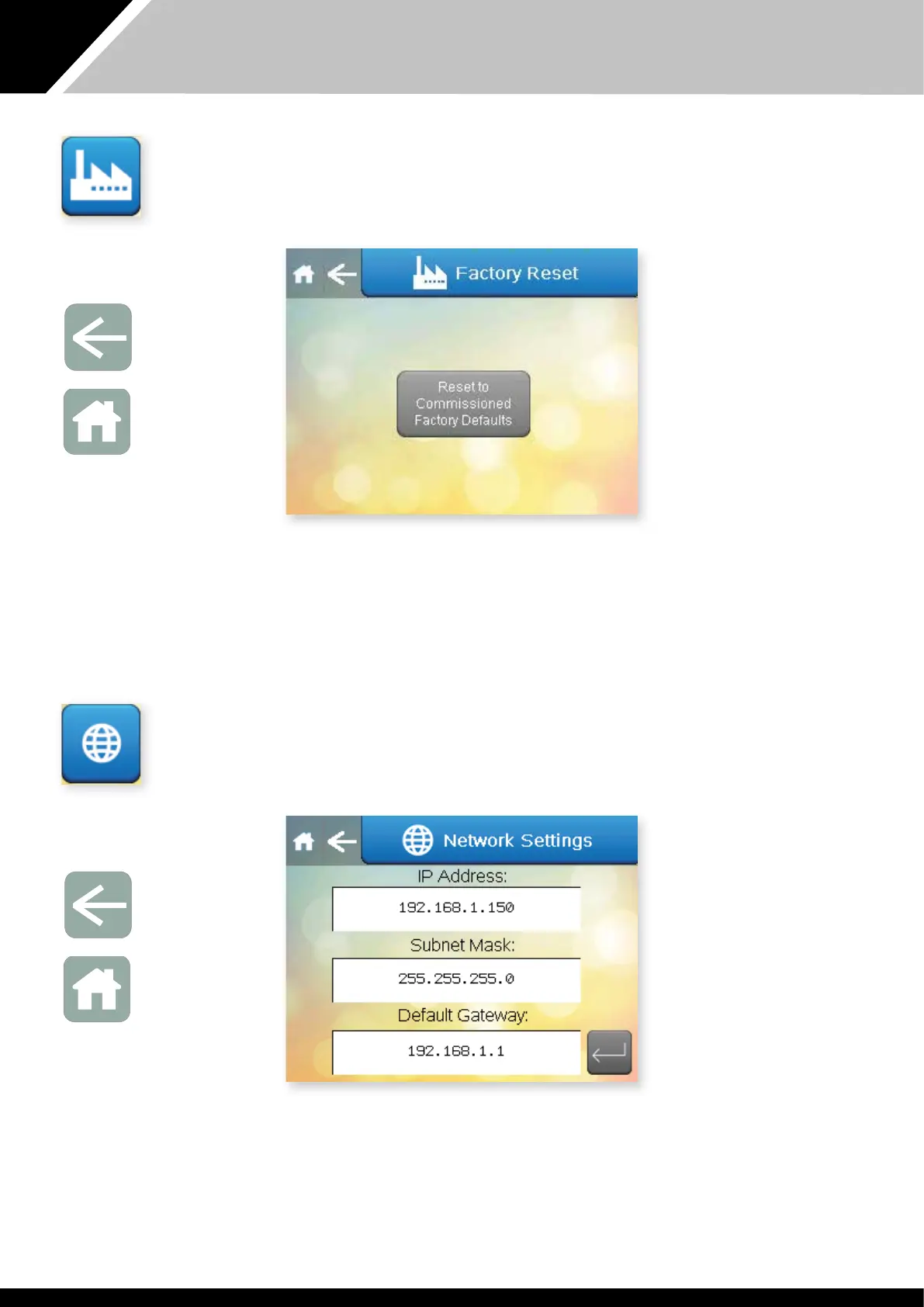
If e settings have been changed in a way at makes e Variheat behave in
an unusual way, e original commissioned settings can restored by pressing
e Reset to Commissioned Factory Defaults button on is screen. Aer is
has been pressed a confirmation appears, pressing again completes e reset.
Press e Arrow to return to e Advanced Setting screen or if noing else
needs to be changed press Home to return to e Home screen.
FACTORY RESET
Press is button on e Advanced Settings menu.
Arrow icon
Return to
User Settings
Home icon
Return to
Home screen
This screen contains settings related to remote access by an Android/iOS
device or ActiveX browser. (See Remote Access to e Variheat Touchscreen
on page 30.) When accessing is screen on remote access, e IP address
shown will be at of e access device, and it is not possible to view/change
e Variheat IP address. The Variheat IP address can only be changed from e
touchscreen.
Press e Arrow to return to e Advanced Setting screen or if noing else
needs to be changed press Home to return to e Home screen.
NETWORK SETTINGS
Press is button on e Advanced Settings menu.
Arrow icon
Return to
User Settings
Home icon
Return to
Home screen


 To Next Page