29
1002595 ISSUE 5 M172 VARIHEAT
PLC ETHERNET SETTINGS
Press e button on e right.
Arrow icon
Return to
User Settings
Home icon
Return to
Home screen
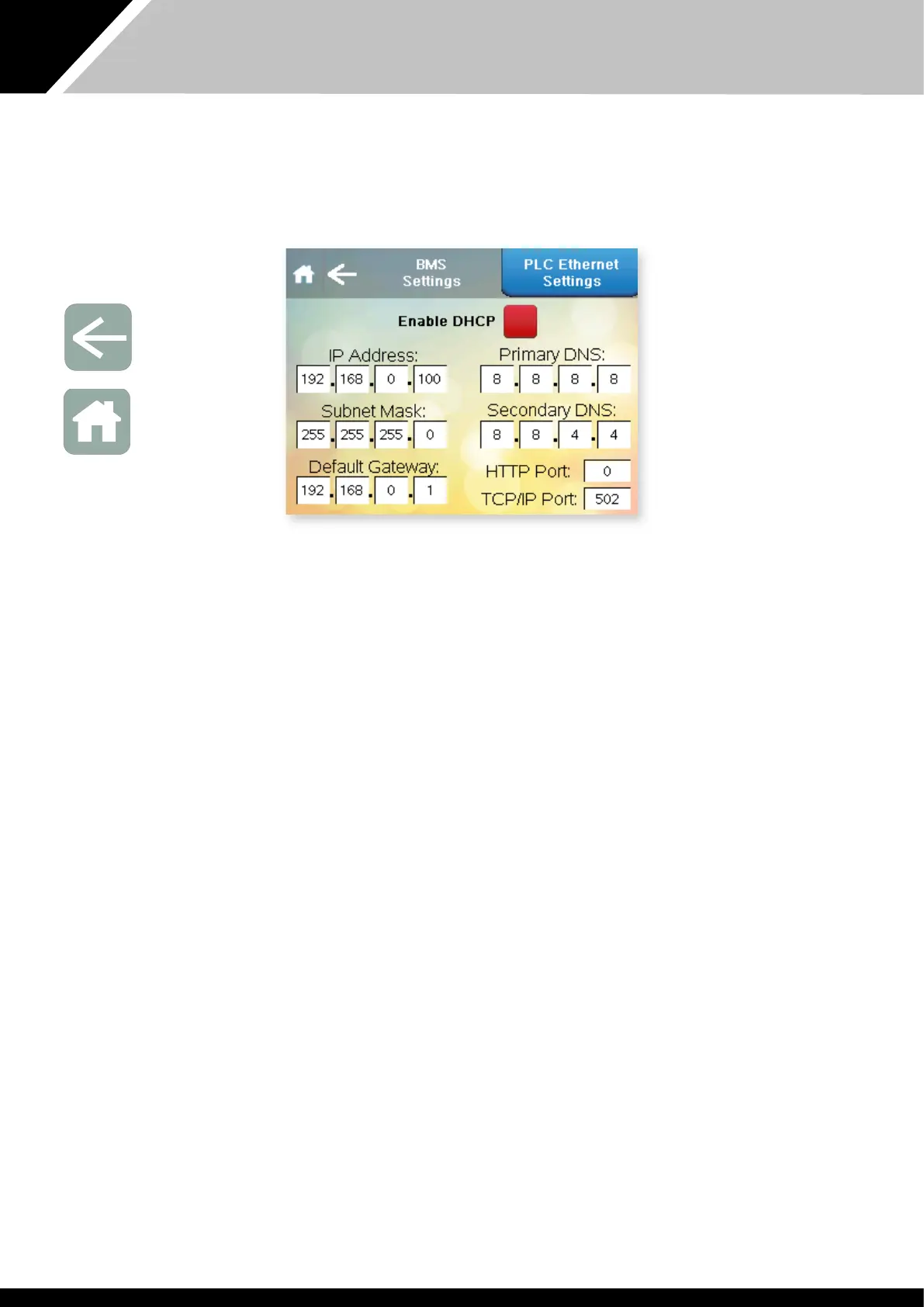
This screen contains settings related to BMS connectivity using BACnet/IP
rough e Eernet port on e PLC. The factory default settings are shown. If
connecting using Modbus/RTU or BACnet MS/TP, see e BMS Settings screen
on page 31.
Enable DHCP. This button toggles between DHCP enabled or disabled.
IP Address, Subnet Mask, Default Gateway, Primary and Secondary DNS – all
fields can be set from 0 to 255.
HTTP Port. Can be set from 0 to 65535. 0 corresponds to default port 80.
TCP/IP Port Can be set from 0 to 65535. Default is 502.
Aer changing any of e above settings, restart e PLC/Variheat, by
cycling e power supply on/off, to save and apply e new settings.
For Modbus Variable list and BACnet Object list please consult e Danerm
Group.


 To Next Page