9
1002595 ISSUE 5 M172 VARIHEAT
LIGHTS AND STANDBY SWITCH
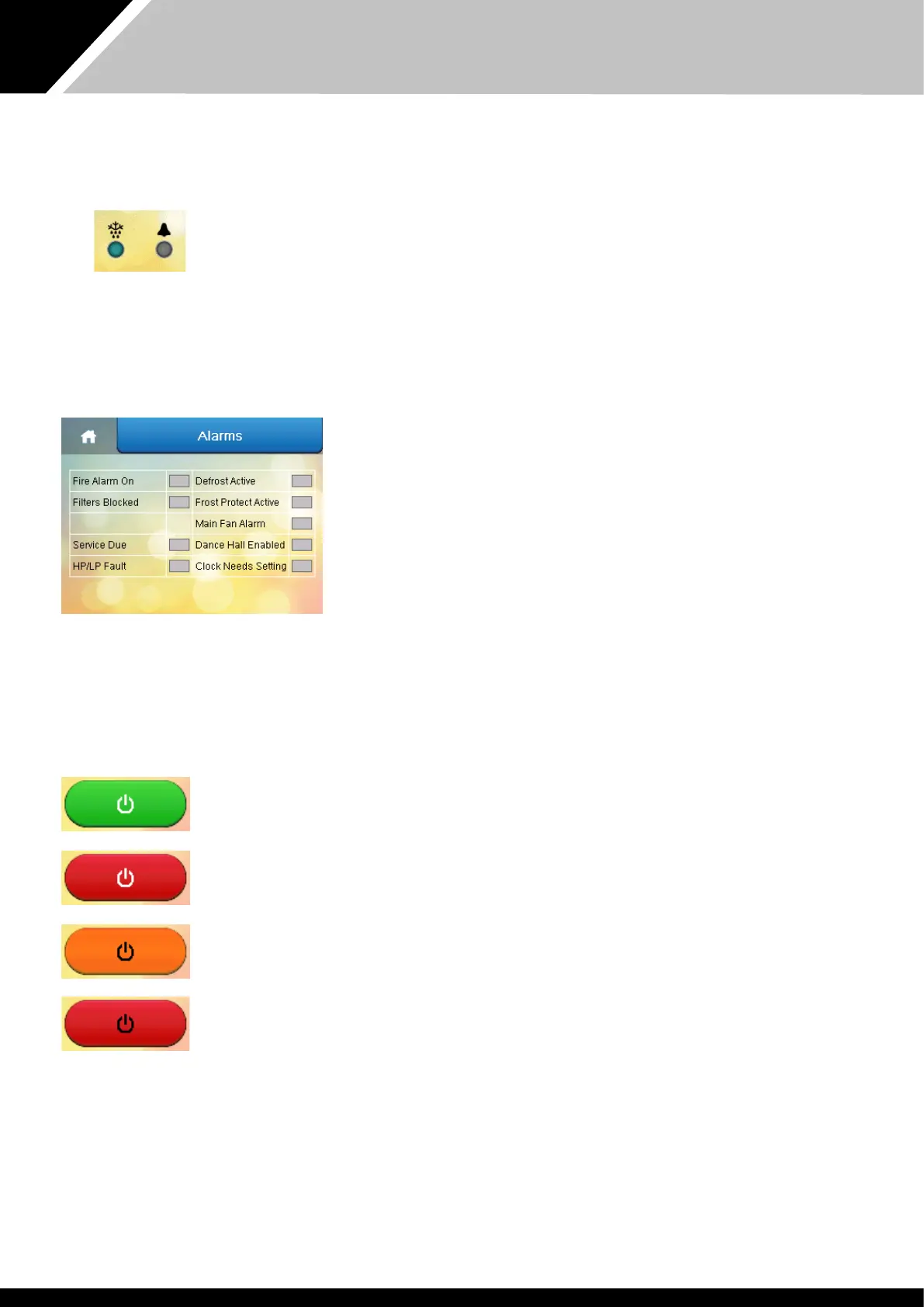
Indicator lights
Pressing is area when an alarm is active displays e "Alarms" screen.
Defrost light
Light blue (solid) – defrost is active. Defrosting is a normal function to remove ice from e heat
recovery surfaces, which may be required when e pool hall air temperature drops below 20°C.
Dark blue (solid) – frost protection is active. (See page 44.)
Light blue and dark blue (flashing) - defrost and frost protection are active.
Alarm light
Red (solid) – fault wi e refrigeration system.
Pink (solid) - main fan fault or blockage.
Orange (solid) – fire alarm is active.
Purple (solid) – clock reset required.
Purple (solid) + ‘S’ – service is overdue. Contact e Danerm Group to arrange servicing of e
Variheat.
There can be more an one alarm. All alarms should be investigated. (See page 17.)
Standby switch
Green and white – ON.
Variheat is powered and operating according to e control system settings.
Red and white – user Standby.
Variheat is powered but not operating. The Variheat has been put into Standby via e user
touchscreen. See caution below. To enable e Variheat, press e red touchscreen button.
Orange and black – remote Standby.
Variheat is powered but not operating. The Variheat has been put into Standby via e remote On/Off
control interface. See caution below. To enable e Variheat, change e remote interface from Off to
On.
Red and black – user and remote Standby.
Variheat is powered but not operating. The Variheat has been put into Standby via e user
touchscreen AND e remote on/off control interface. See caution below. To enable e Variheat, press
e red touchscreen button AND change e remote interface from Off to On.
There is a ten second delay before e Variheat starts.
Caution: in all Standby modes, e Variheat system remains powered and live. Ensure e Variheat is
isolated from e power supply before any servicing or electrical work commences. See power light see
page 6
Following a power interruption e Variheat will eier remain in Standby or attempt to restart
automatically, according to e user setting. See page 25. Screen settings.


 To Next Page