44 BRIO 36 Audio Production System with Optional Networking SETTING UP
GENERAL
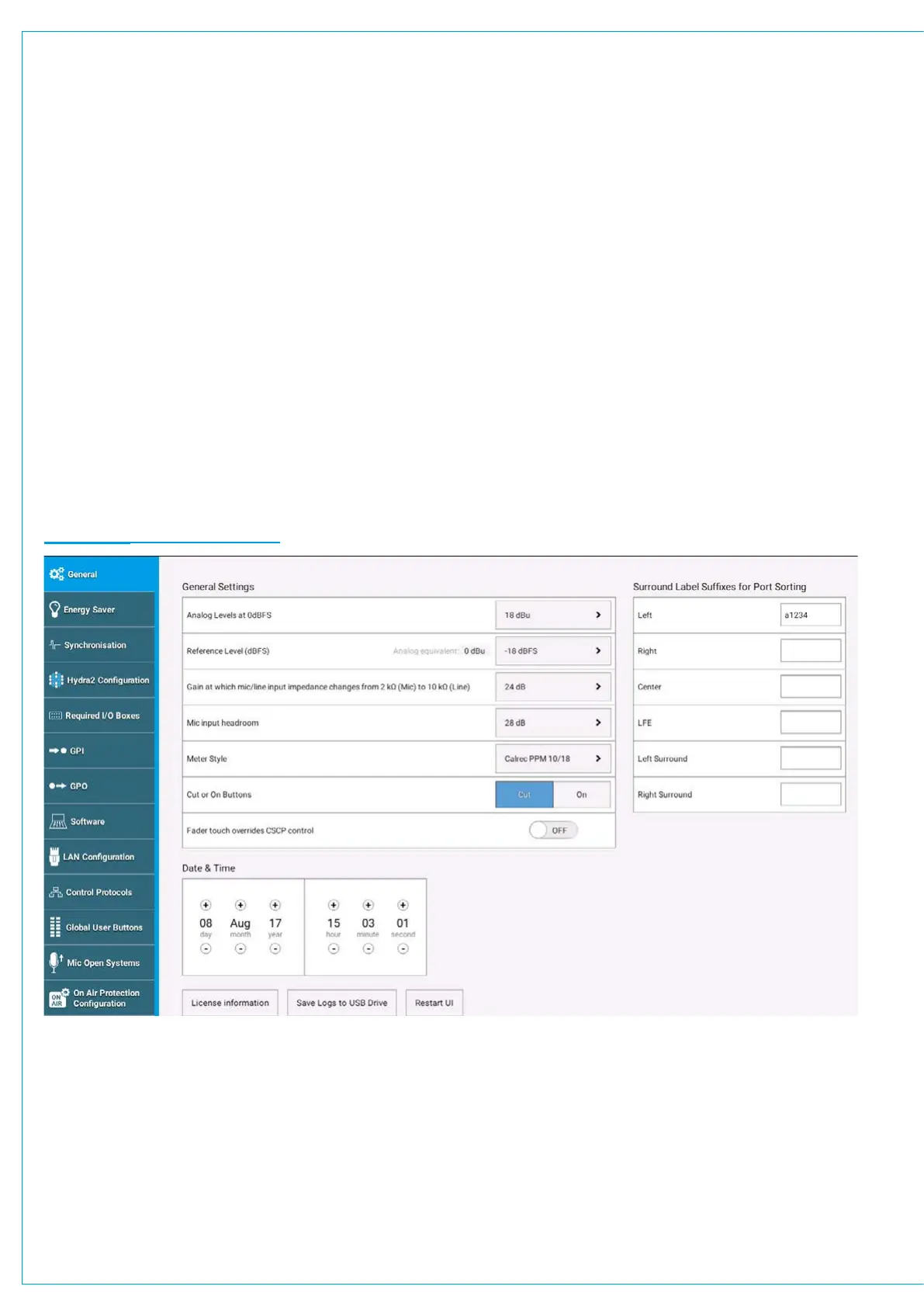
To access Brio 36’s general settings, from the ‘active Show’ view, tap SYSTEM SETTINGS in the top right of the screen
and then select ‘General’’ from the menu on the left hand side. To edit these settings you must be logged in as an
administrator.
General Settings
The following general settings are available:
• The analogue level at 0 dBFS can be calibrated to 15, 18, 20, 22, 24 or 28 dBu.
• The reference level (dBFS) can be set to an integer value between -6 and -32 dBFS. The reference level sets default
level values for the dynamics and oscillator modules.
• The point at which the input impedance changes between mic and line level can be set to 18, 20, 22 or 24dBu.
• The mic input headroom for the system can be chosen. Options range from 20 dB to 36 dB.
• The default meter style can be set for all meters on the meter displays. PPM or VU scales can be chosen along with
various colour split points, controlling the level ranges of the green, yellow and red elements of the meter bar graphs.
• Cut/On button functionality can be set: With cut selected, paths are cut when cut/on buttons are active; with on
selected, paths are switched on when the cut/on buttons are active, and so paths are cut when cut/on buttons are not
active.
• When faders are under CSCP control, this can be overridden when the fader is touched; Brio 36’s faders are touch
sensitive. This feature can also be disabled.
FIGURE 1 - GENERAL SETTINGS
Surround Leg Suffixes
You can enter suffixes to be automatically displayed at the end of the individual legs of surround path port labels within the
I/O patching screen. Suggested suffixes are L, R, C, LFE, Ls, Rs. These suffixes help to keep the surround legs together
and in the correct order when sorting tables within the I/O patching screen.
Date and Time
The current date & time are displayed at the bottom of the General settings page and can be modified in Admin mode.


 To Next Page