83
Replay
Replay allows the user to select a number of channels to switch between input 1 and input 2 from one control which can
be a user button or be controlled from the screen. This is also achieved from the Settings menu on the Access>Input
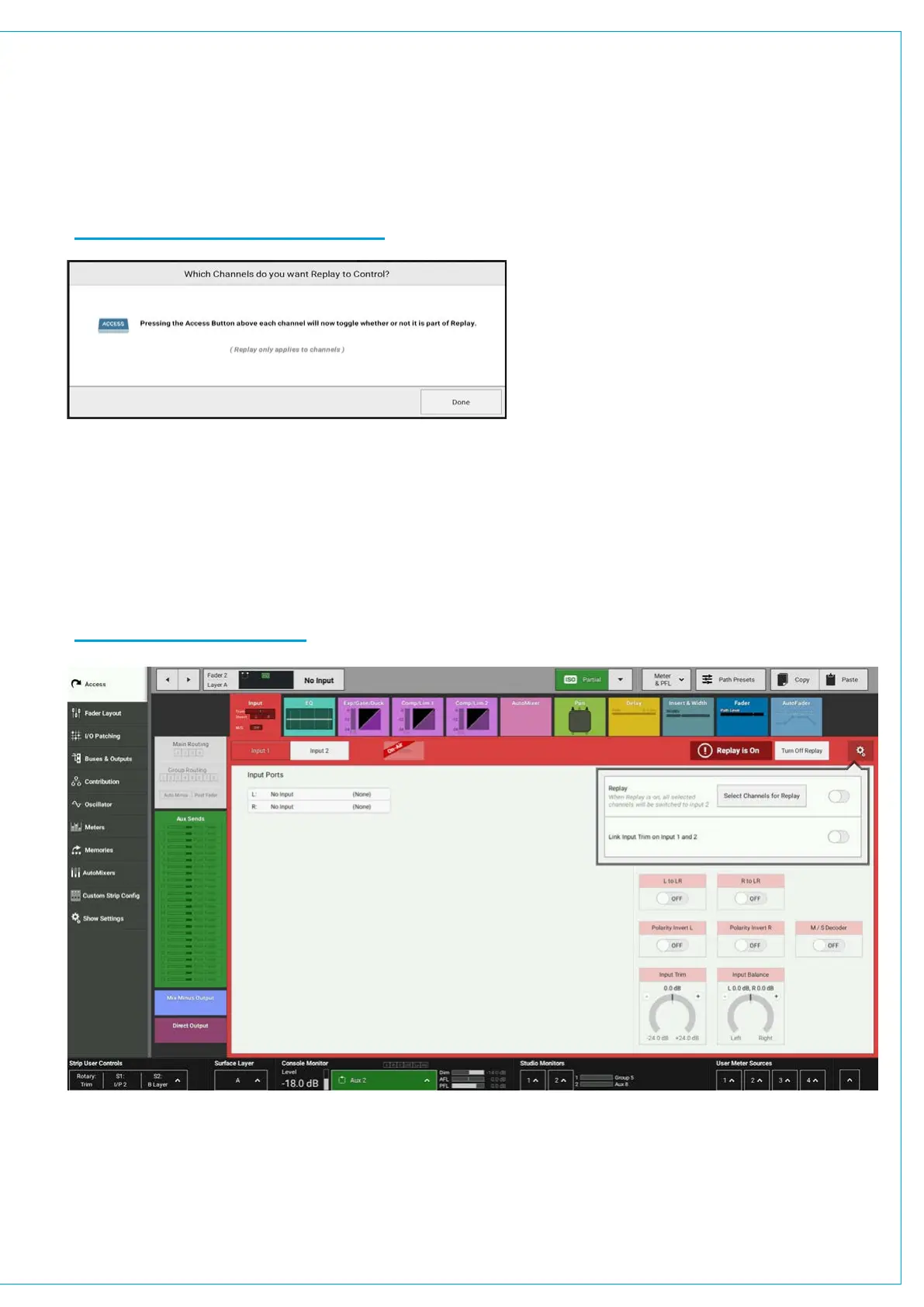
screen shown in Figure 5 above. The user then selects paths for replay using the ACCESS keys. See Figure 6.
The fader displays change to say ‘REPLAY’ rather that not in replay’ as appropriate.
F
I
G
U
R
E
6
-REPLAY CHANNEL SELECTOR
When Replay is active these channels will switch to Input 2, when Replay is turned off the input channels switch back to
input 1. Replay makes setting up a virtual sound check easy. With the sources connected to input 1 each source is sent
to a recorder and its returns are connected to input 2.
When the talent leaves the user can turn replay on, play the recording and continue the sound check. On completion
the replay is turned off to switch all the inputs back to the live sources. Note: Replay can also be controlled from a GPI if
required. Figure 7 shows system in Replay.
F
I
G
U
R
E
7
-SYSTEM IN REPLAY


 To Next Page