89
EXTERNAL INPUTS
Brio 36 has a pool of 48 mono external input resources from which the user can create any combination of mono,
stereo and 5.1 inputs, using one, two or six resources respectively. External inputs can be monitored and metered
and are available as patching destinations within the I/O patching screen.
External inputs are typically used to monitor down-stream feeds or ‘off-air’ returns to ensure the console output is not
being compromised on its way to its intended destination.
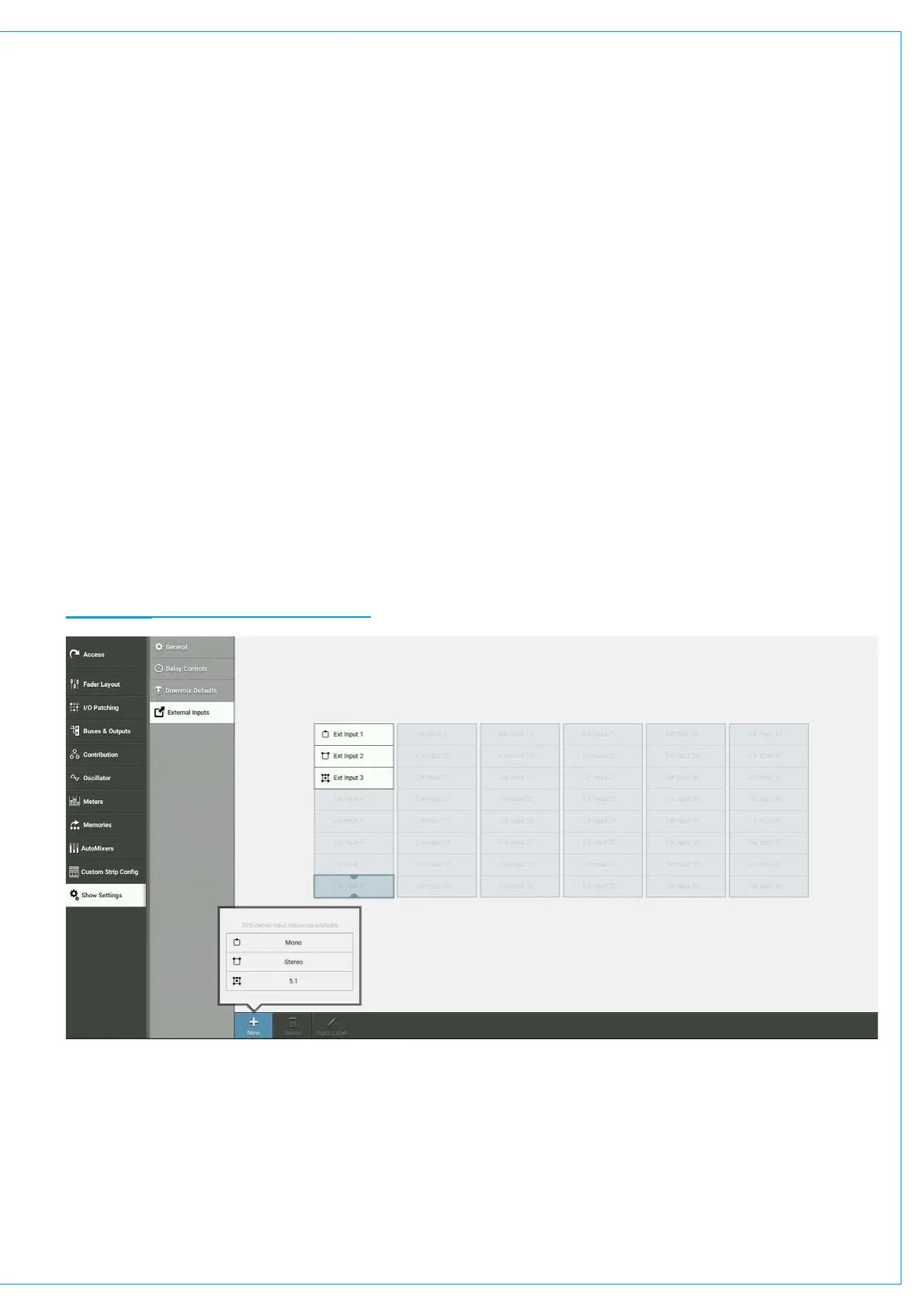
To view the external inputs screen, tap SHOW SETTINGS at the bottom of the Show menu, then tap EXTERNAL
INPUTS.
Creating External Inputs
Within the external inputs screen, select one or more cells using one of the following options:
• Tap to select a single cell.
• Touch and drag to select multiple cells.
• Tap, then drag selection handles to select multiple cells.
... then tap NEW.
Select a path width from the pop-up—mono, stereo and 5.1—and the selected cells are populated with that choice.
Note: within the pop-up the number of remaining external input resources is displayed.
FIGURE 1 - CREATING EXTERNAL INPUTS


 To Next Page