1- 05/2015- © Came S.p.A. - The manual's contents may be edited at any time without notice.
Release the operator
ELECTRICAL CONNECTIONS
⚠
Before powering up the board, cut off the mains power supply.
Power supply (V - 50/60 Hz): 230 AC
Board functions:
• Movement control and obstacle detection
• Reopening during closing
• Adjustable automatic reclosing time
• Open-stop-close-stop from transmitter and/or from button
• Courtesy light (at each opening command, the courtesy
light stays on for three minutes)
FUSE TABLE
Line fuses (A) 5
LIGHTS
LED courtesy (W) ≤ 1
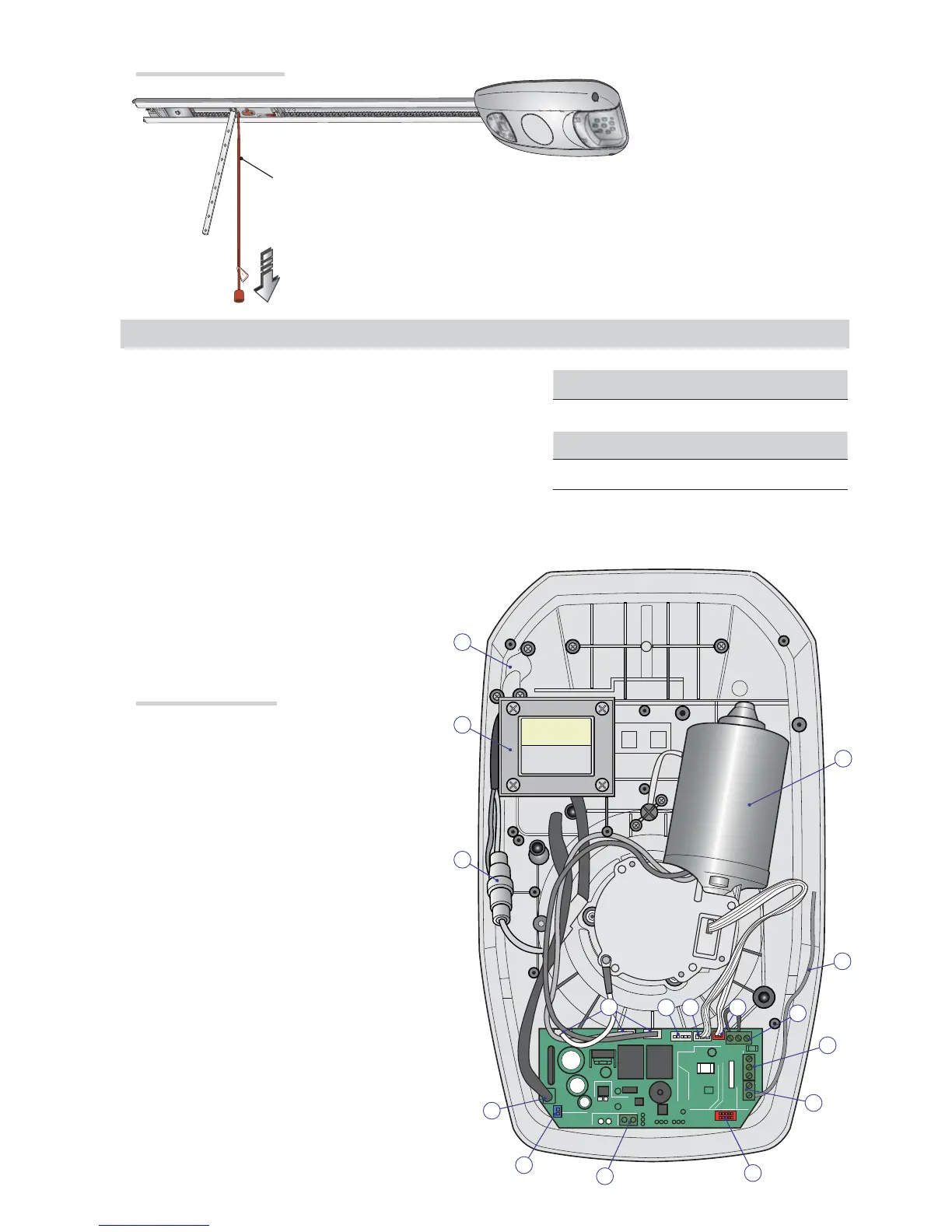
Description of parts
1. Line fuse
2. Gearmotor
3. Transformer
4. Cables input
5. AF card connector
6. Antenna cable
7. Photocell connection terminal board
8. STOP button connection terminal board
9. Limit switch connection terminal board
10. Encoder connection terminal board
11. Display connection terminal board
12. Motor connections
13. Transformer connections
14. Courtesy light connection terminal board
15. Antenna connection terminals
16. Flashing light connection terminal boards
Latch
To release the operator, pull the cord ⓒdownwards.
Locking
To lock the operator back into place, use the transmitter or a command button.



 To Next Page