1- 05/2015 - © Came S.p.A. - The manual's contents may be edited at any time without notice.
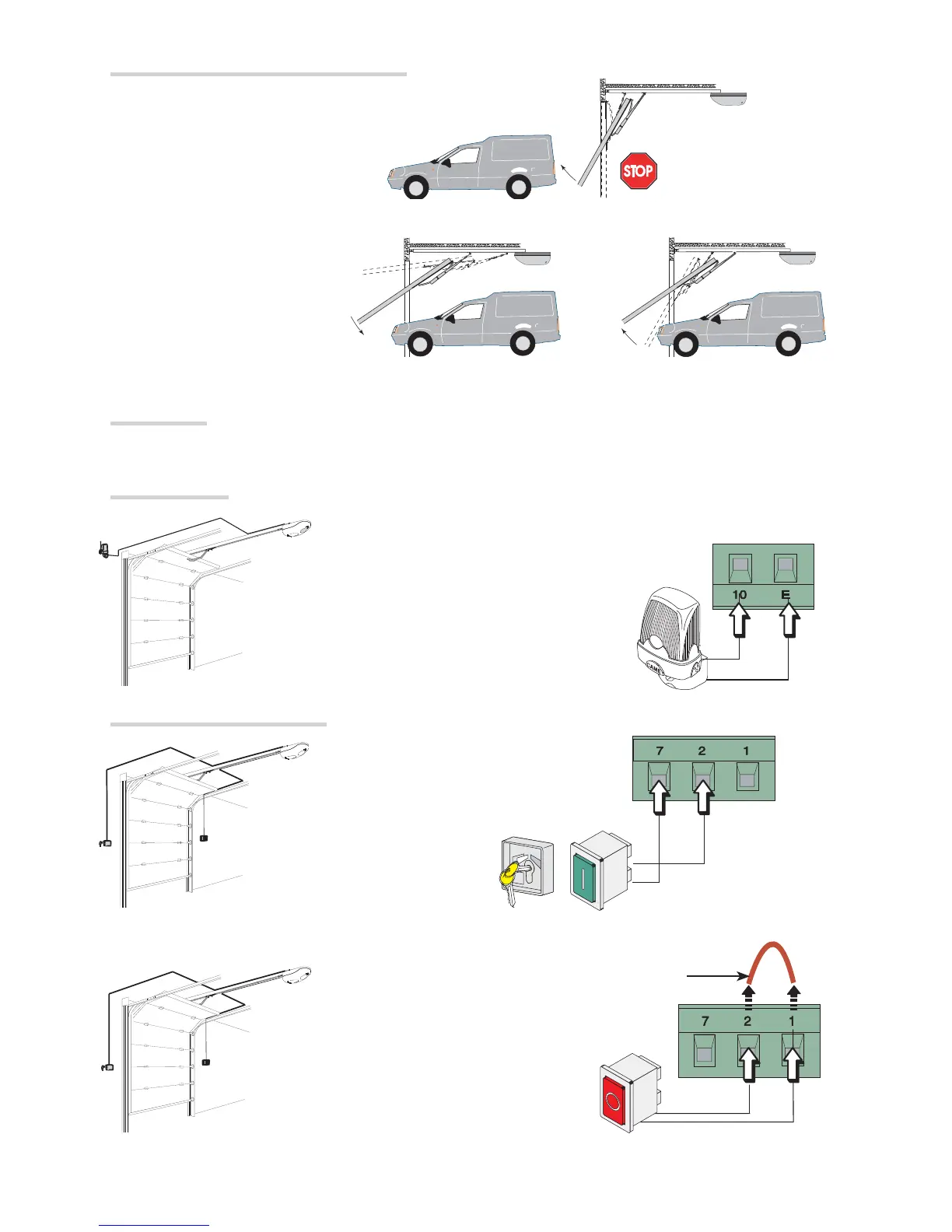
When CLOSING: inverts the
direction of travel until opening is
complete.
After three consecutive inversions,
the door stays open and excludes
the automatic closing: to close,
either use the transmitter or button.
When OPENING: the door stops. To
resume movement, either press a button
or use the transmitter.
Movement control and obstacle detection
Power supply
⚠The operator is supplied with an electrical cable (L = 1.2 m) with an already connected Shuko plug.
Warning devices
Flashing light (contact rated for: 24 V - 25 W max).
It fl ashes during opening and closing.
Command and control devices
Stop button (NC contact). Enables the door to stop and excludes the automatic closing. To resume movement
either press the control button or any other control device.
If a device is connected, remove the bridge
OPEN-STOP-CLOSE-STOP function from control device (NO contact).



 To Next Page