12
DMX
ITALIANO
POLSKI
ESPAÑOL
FRANCAIS
DEUTSCHENGLISH
8
9
8
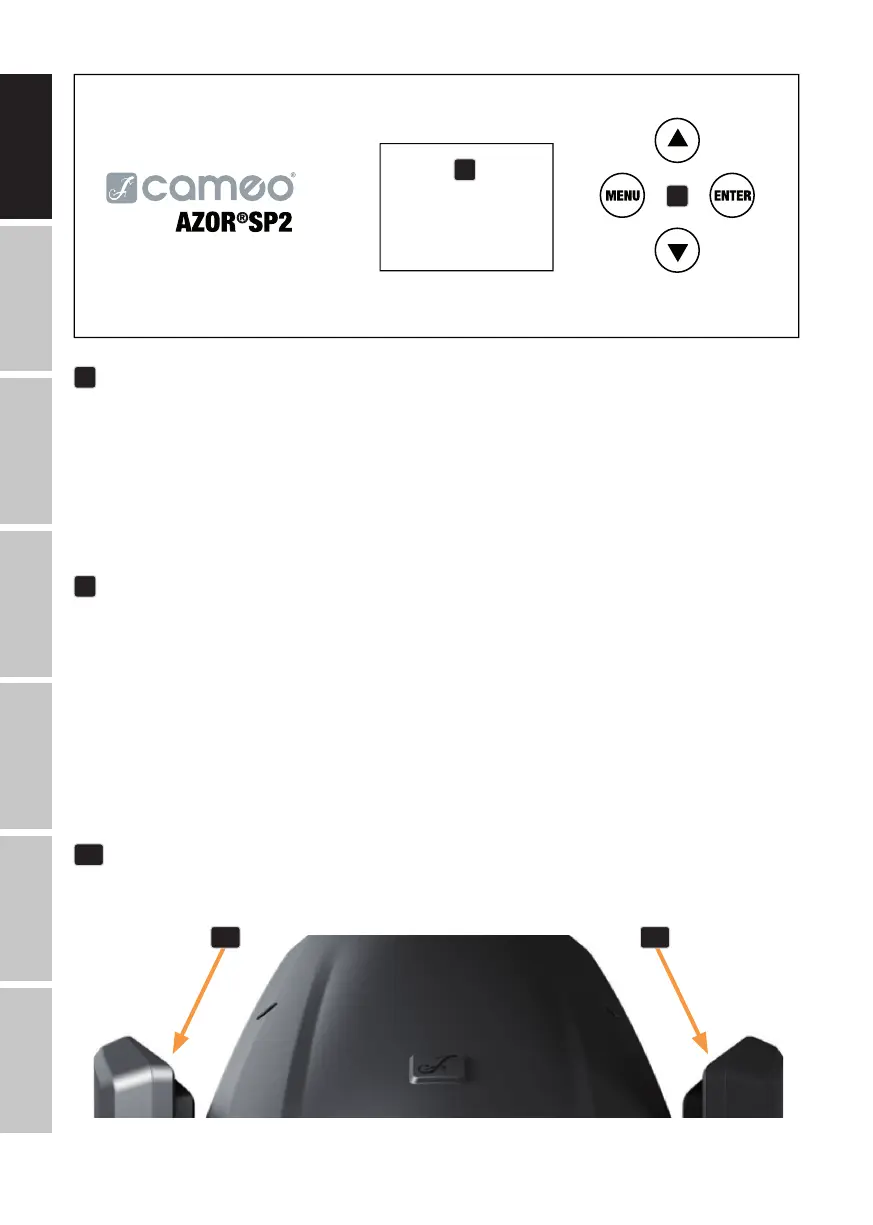
OLED DISPLAY
The OLED display shows the currently active operating mode (main screen), the menu items
and the numerical value or operational status of certain menu items. If no input is made within
approximately one minute, the display automatically returns to the main screen. Note on the main
screen in operating modes with external control: In the event that the control signal is interrupted,
the characters in the display begin flashing; once the control signal is present again, the flashing
stops.
9
CONTROL BUTTONS
MENU – Press MENU to access the main menu. Press again or repeatedly to return to the main
screen. Pressing MENU without confirming a value or status change by pressing ENTER restores
the previously confirmed value or status.
ENTER – press ENTER to access the menu levels, where you can make value changes and access
the sub-menus with the ENTER button. ENTER is also used to confirm value or status changes.
⏶ and ⏷ – Select menu items in the main menu (DMX address, DMX mode, etc.) and in the
sub-menus. Allows you to change the value of a menu option, such as the DMX address (long
press = quick value change).
10
RECESSED GRIPS
In addition to the two transport handles on the base of the device, there are recessed grips at the
top of the inner sides of the two device arms.
10 10


 To Next Page