24
DMX
ITALIANO
POLSKI
ESPAÑOL
FRANCAIS
DEUTSCHENGLISH
REPLACING GOBOS
ATTENTION!
Gobos may only be replaced by qualified personnel. If you are not qualified to do this,
do not try to replace gobos yourself. Refer instead to professional companies.
When carrying out any work, make sure that no foreign bodies enter the housing!
When replacing the gobos, make sure that the gobos are inserted correctly into the
corresponding gobo holder. Otherwise, heat damage to the gobos and gobo holders
may occur!
1. Disconnect all poles of the device from the power supply (pull out the mains plug). Now lock the
light head (pan and tilt lock).
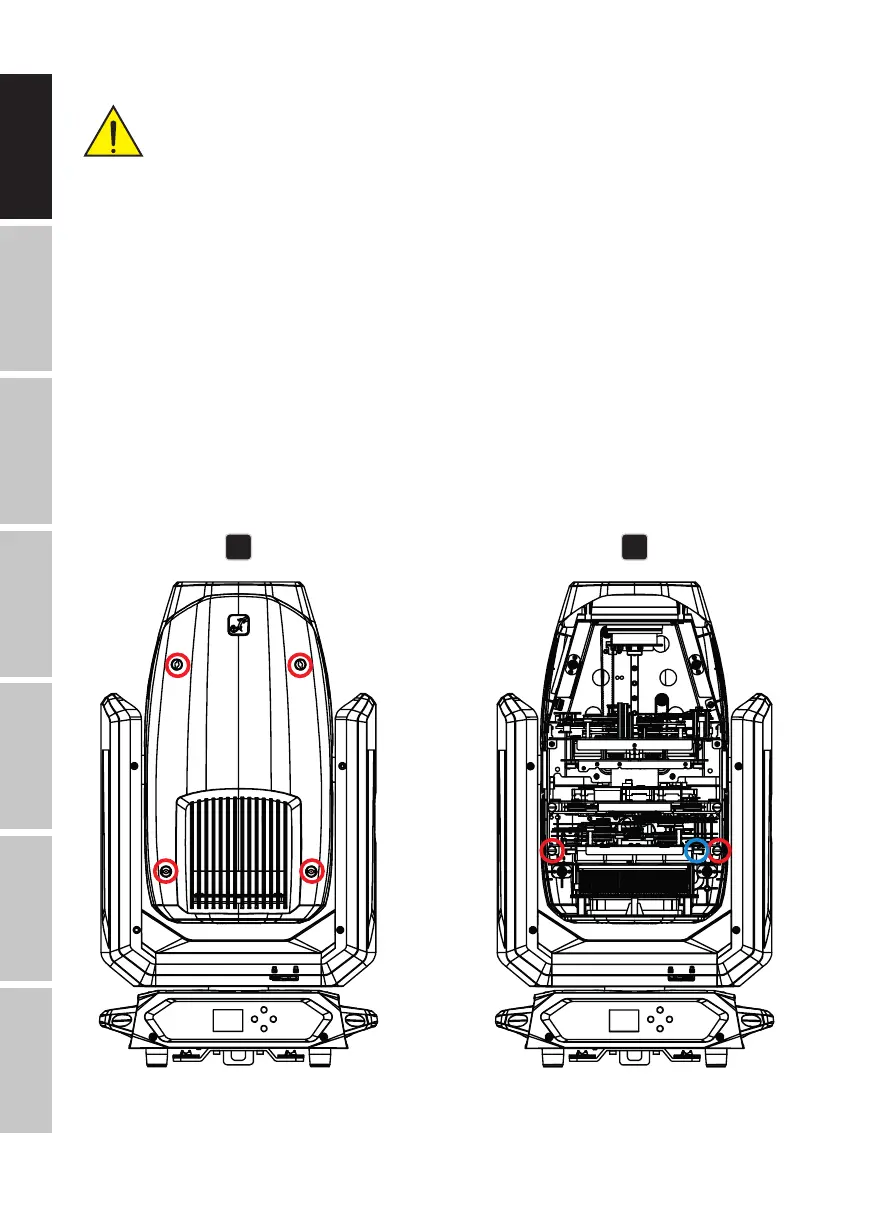
2. Release the four locks on the cover of the device head on the side opposite the Pan Lock (see
markings in the illustration, bayonet lock with cross-slotted head, 1/4 turn to the left). Loosen
the cover from the light head, loosen the cover’s safety cable, and place it to one side.
3. Carefully disconnect the four-pin plug connection for the power and signal supply of the gobo
module (blue marking in the illustration). Then loosen both screws that hold the module in
the guide, and pull the module out of the light head (lower module, see red markings in the
drawing).
2 3


 To Next Page