13
DMX
DEUTSCHFRANCAIS
ESPAÑOL
ENGLISH
ITALIANO POLSKI
LOCK UNLOCK11
11
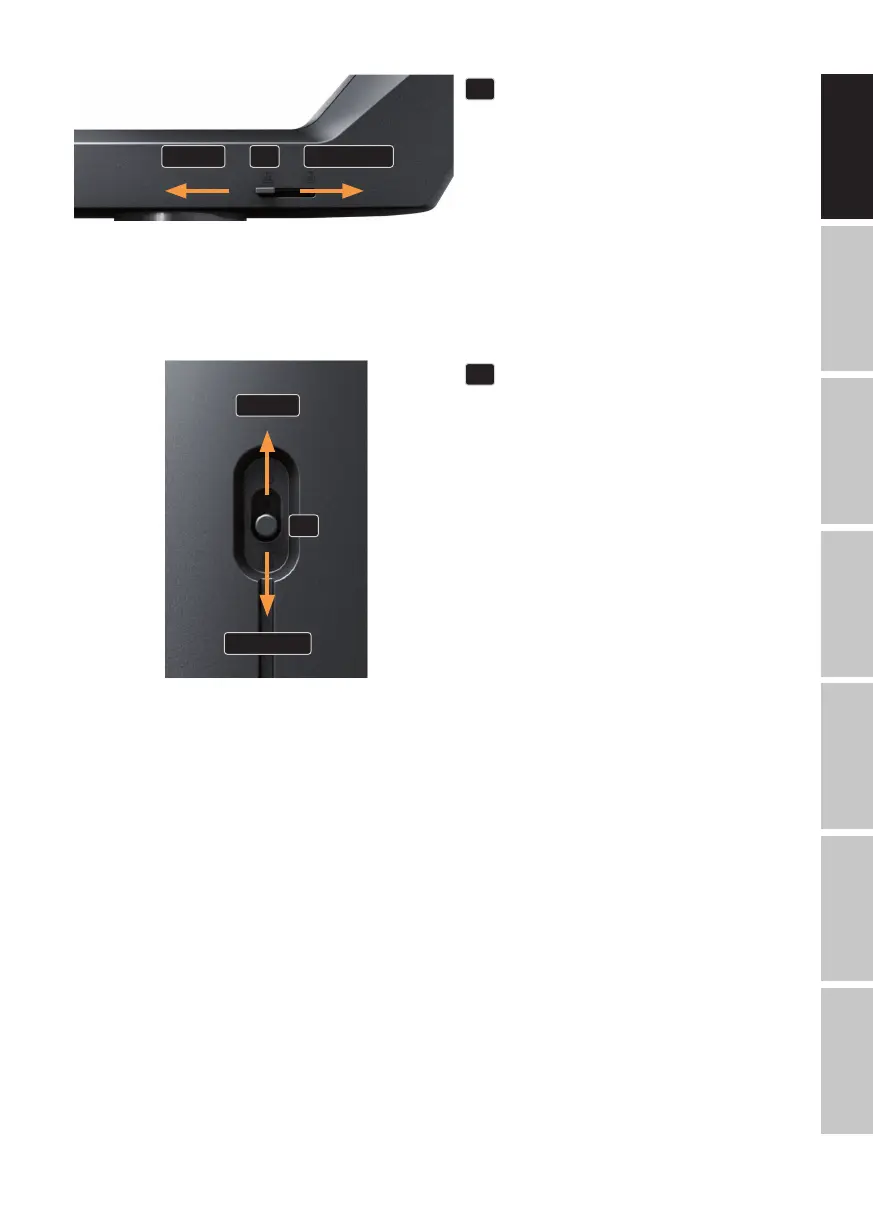
PAN LOCK
Mechanical locking device used to prevent
the rotation of the head in the horizontal
direction during transport. Disconnect the
unit from the mains, move the head parallel
to the base (8 possible positions), and push
the locking lever in the direction of the pan
rotation axis (LOCK) to lock it in position.
Unlock the locking device before device
start-up (UNLOCK).
UNLOCK
LOCK
12
12
TILT LOCK
Mechanical locking device used to prevent
rotation of the head in the vertical direction
during transport (7 possible positions). Dis-
connect the unit from the mains and slide
the locking lever towards the tilt rotation
axis, moving the head of the unit vertically
until one of the seven locking positions is
found and the locking lever engages (LOCK).
Unlock the locking device before device
start-up (UNLOCK).
- Illustrations similar -
OPERATION
NOTES
Upon switching on the light, the message "Update Wait" is displayed momentarily, followed by
"Welcome to Cameo", the model name and the software version. Thereafter, the motors are reset
(Motor Reset Please Wait). After this process, the fixture is ready for operation and the previously
activated operating mode is launched.
MAIN SCREEN IN DMX OPERATING MODE
In DMX mode, the main screen shows the currently set DMX start address (see illustration). Flash-
ing characters indicate that no DMX signal is present.


 To Next Page