14
DMX
ITALIANO
POLSKI
ESPAÑOL
FRANCAIS
DEUTSCHENGLISH
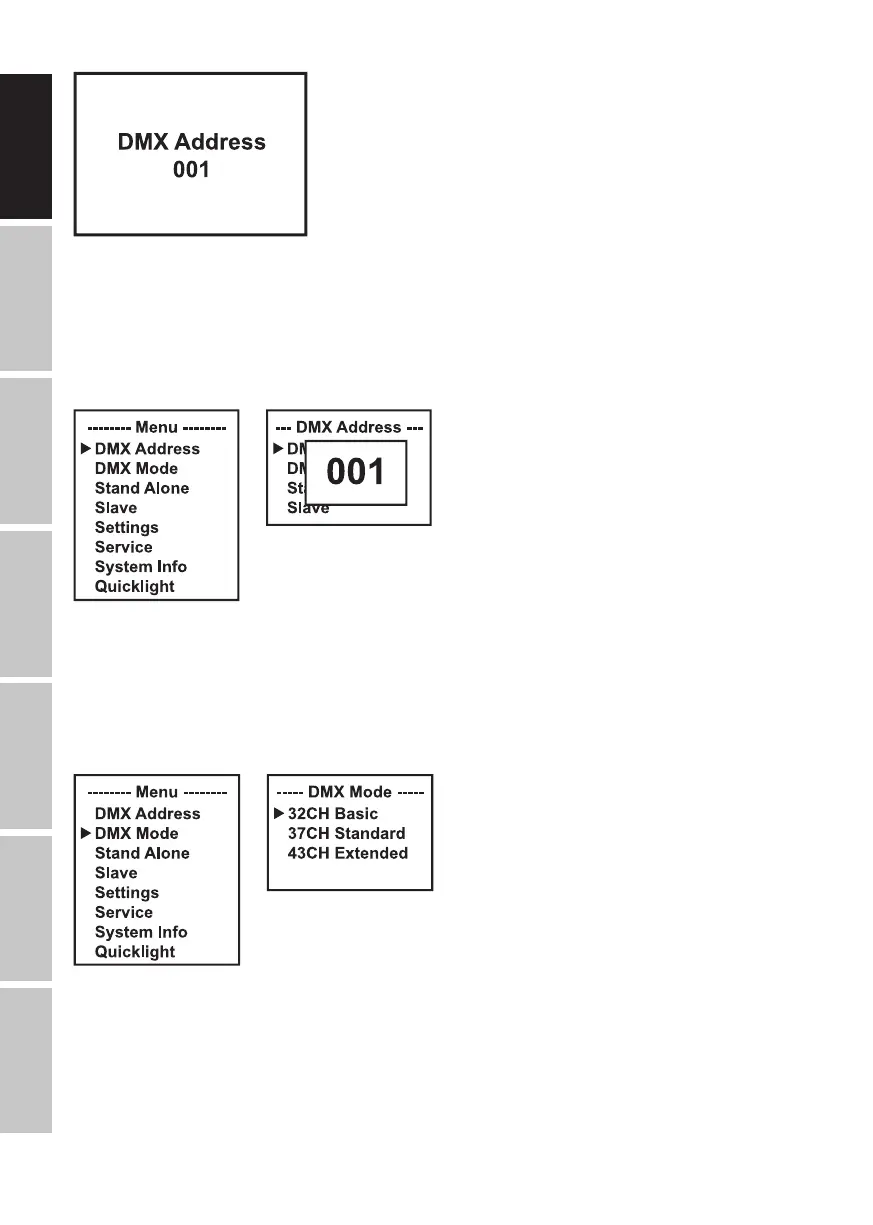
SETTING THE DMX START ADDRESS (DMX Address)
Starting from the main screen, press MENU to enter the main menu. Nowuse ⏶ or ⏷ to select
the menu item DMX Address and confirm with ENTER. Use the ⏶ or ⏷ buttons to configure the
desired DMX start address and press ENTER to confirm (the highest possible value depends on
the selected DMX mode).
SETTING THE DMX OPERATING MODE (DMX Mode)
Starting from the main screen, press MENU to enter the main menu. Nowuse ⏶ or ⏷ to select
the menu item DMX Mode and confirm with ENTER. Select the desired DMX operating mode
using ⏶ or ⏷ and confirm with ENTER. Tables showing the channel assignment of the different
DMX modes can be found in the DMX CONTROL section of this user manual.
STAND-ALONE MENU
In the stand-alone operating modes (Play Scene and Play Loop), the control signal of the cor-
responding mode can be output to slave units via XLR. If you do not want to output the control
signal, deactivate the output.
A delay can be set for slave units for the time-delayed output of the control signal of the stand-
alone operating modes.


 To Next Page