48
MF 400 – 600
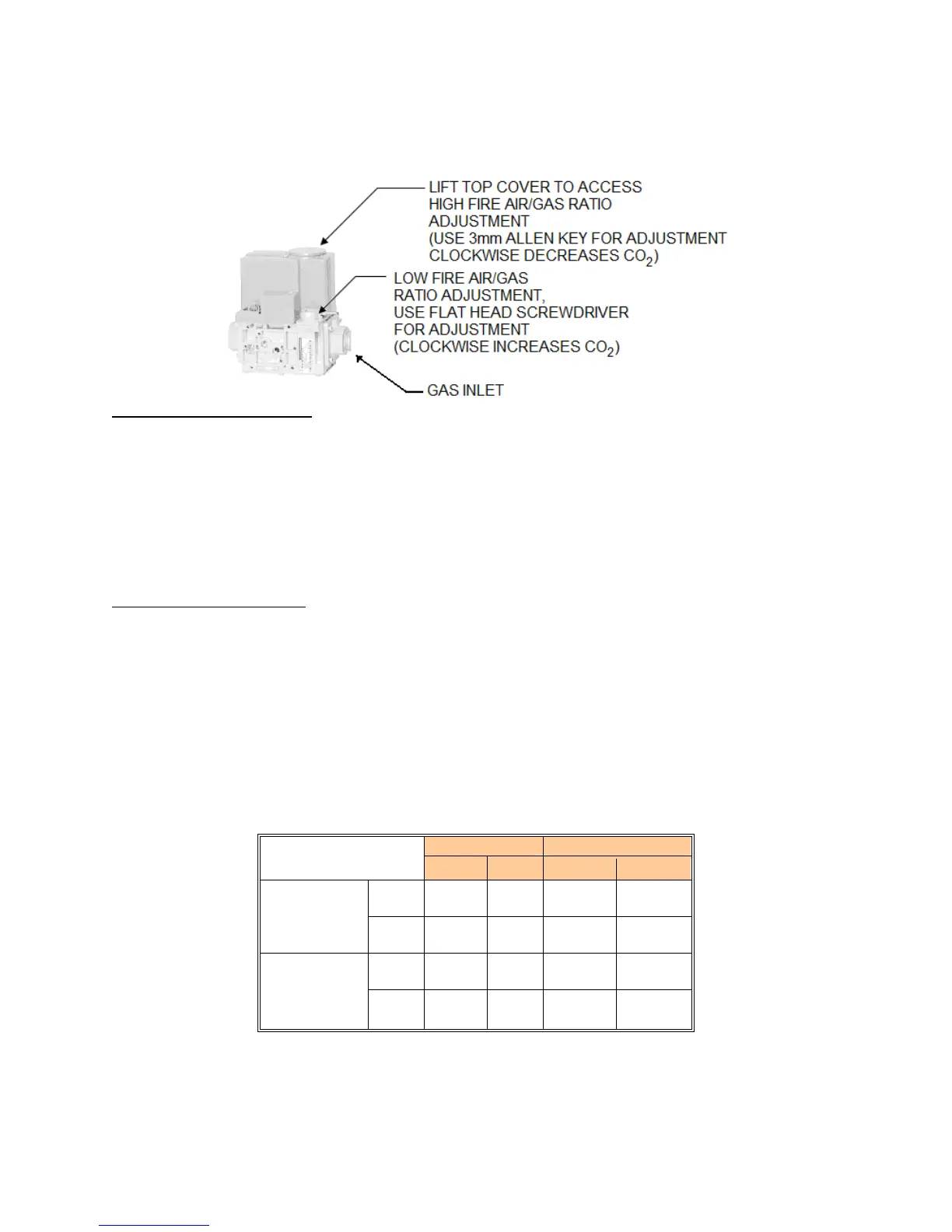
Figure 29: MF 400 – 600 Gas Valve
To adjust the high fire setting
Set the Target Temperature to 190
o
F using the BTC 1 Controller.
Once the appliance is at maximum fan speed locate the input adjustment screw on the top side of the gas
valve. Using a flat head screwdriver turn the screw clockwise to decrease CO
2
levels and counter-
clockwise to increase CO
2
levels. Turn the screw 1/4 turn in either way for each adjustment to keep track
of the adjustments. After adjusting the screw wait a moment for the combustion levels to stabilize before
attempting to make any further adjustments. Continue this procedure until combustion levels are satisfied.
Reset the Target Temperature to normal operating conditions on the BTC 1 Controller.
To adjust the low fire setting
Observe the Boiler Inlet Temperature. Set the Boiler Target temperature so that it is 10
o
F above the Boiler
Inlet Temperature. The boiler will begin to modulate to low-fire as setpoint is being reached. The actual
modulation rate can be shown on the screen as Modulation, this will be shown as a percentage. Low-fire
is achieved at 25%.
The MicoFlame will respond immediately and operate at low fire. When this is achieved locate the low fire
adjustment screw as illustrated in Figure 28. Using a flat screwdriver rotate clockwise to increase CO
2
levels and counter-clockwise to decrease CO
2
levels. When the correct combustion values are achieved
replace the screw cap back on to the gas valve.
Reset the Target Temperature to normal operating conditions on the BTC 1 Controller.
Table 12: Combustion Values
Natural Gas Propane
CO
2
CO CO
2
CO
Max.
Fire
7.5% -
8.5%
< 50
PPM
9.0% -
10.0%
< 50
PPM
Non-
Condensing
Min.
Fire
7.0% -
7.5%
< 50
PPM
8.5% -
9.0%
< 50
PPM
Max.
Fire
8.5% -
9.0%
< 50
PPM
10.0% -
10.5%
< 50
PPM
Condensing
Min.
Fire
7.5% -
8.0%
< 50
PPM
9.0% -
9.5%
< 50
PPM





 To Next Page