15
1
2
3
4
5
Introduction
Contents at
a Glance
Basic
Operation
Advanced
Operation
Advanced
Image Editing
and Printing
Editing JPEG
Images
Index
Processing
Large Numbers
of Images
Reference
Efficiently Checking/Sorting Images
You can enlarge images displayed as thumbnails in the main window
and efficiently check each image. You can attach check marks and sort
images into three groups.
1
Click the [Select all] button on the toolbar.
¿ The color of the image frame around all the images changes.
2
Display the quick check window.
O Select the [Tools] menu [Start Quick check tool].
¿ The quick check window appears.
3
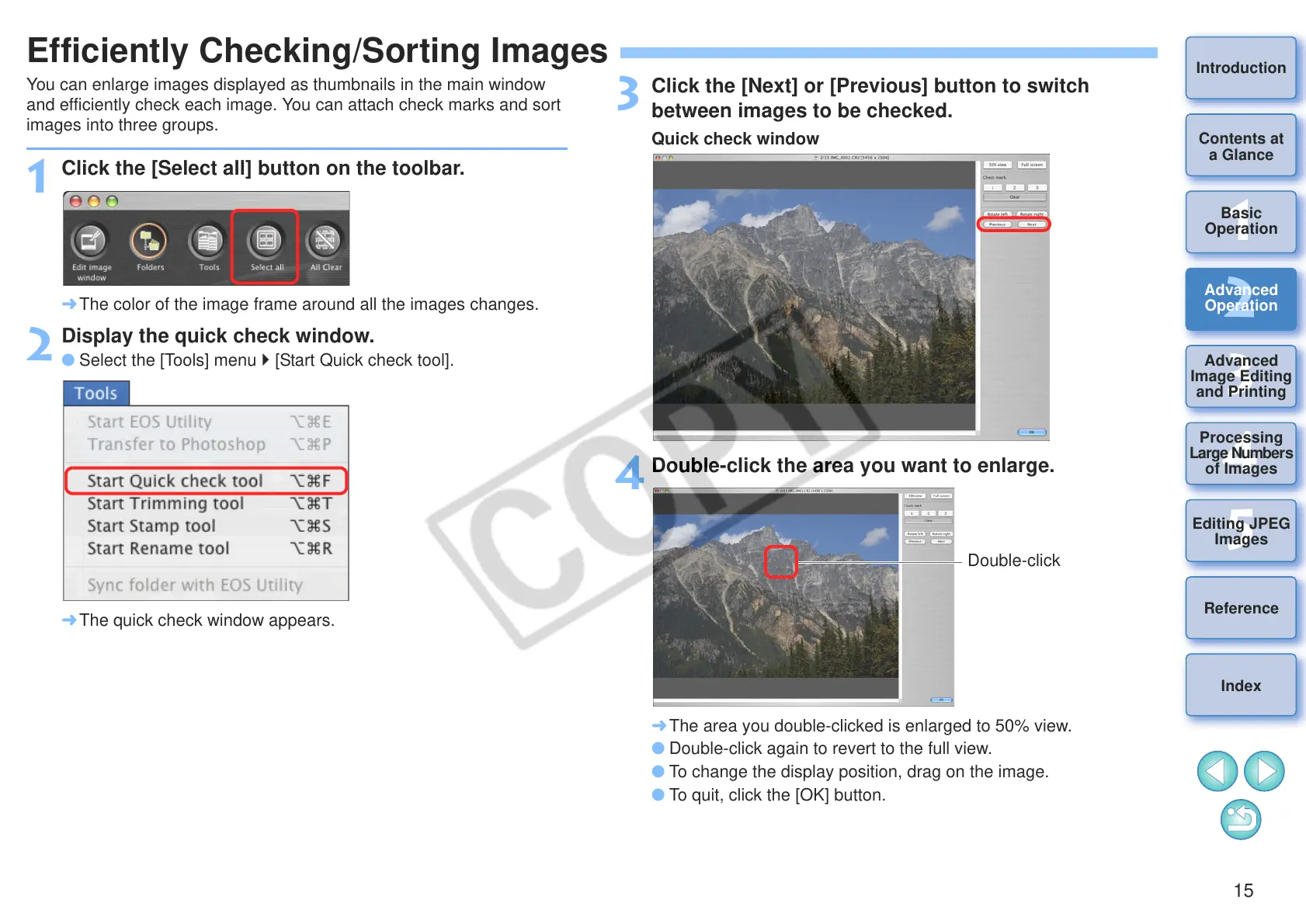
Click the [Next] or [Previous] button to switch
between images to be checked.
4
Double-click the area you want to enlarge.
¿ The area you double-clicked is enlarged to 50% view.
O Double-click again to revert to the full view.
O To change the display position, drag on the image.
O To quit, click the [OK] button.










 To Next Page