17
1
2
3
4
5
Introduction
Contents at
a Glance
Basic
Operation
Advanced
Operation
Advanced
Image Editing
and Printing
Editing JPEG
Images
Index
Processing
Large Numbers
of Images
Reference
Sorting Images in the Main Window
You can sort images by attaching three types of check marks in the main
window.
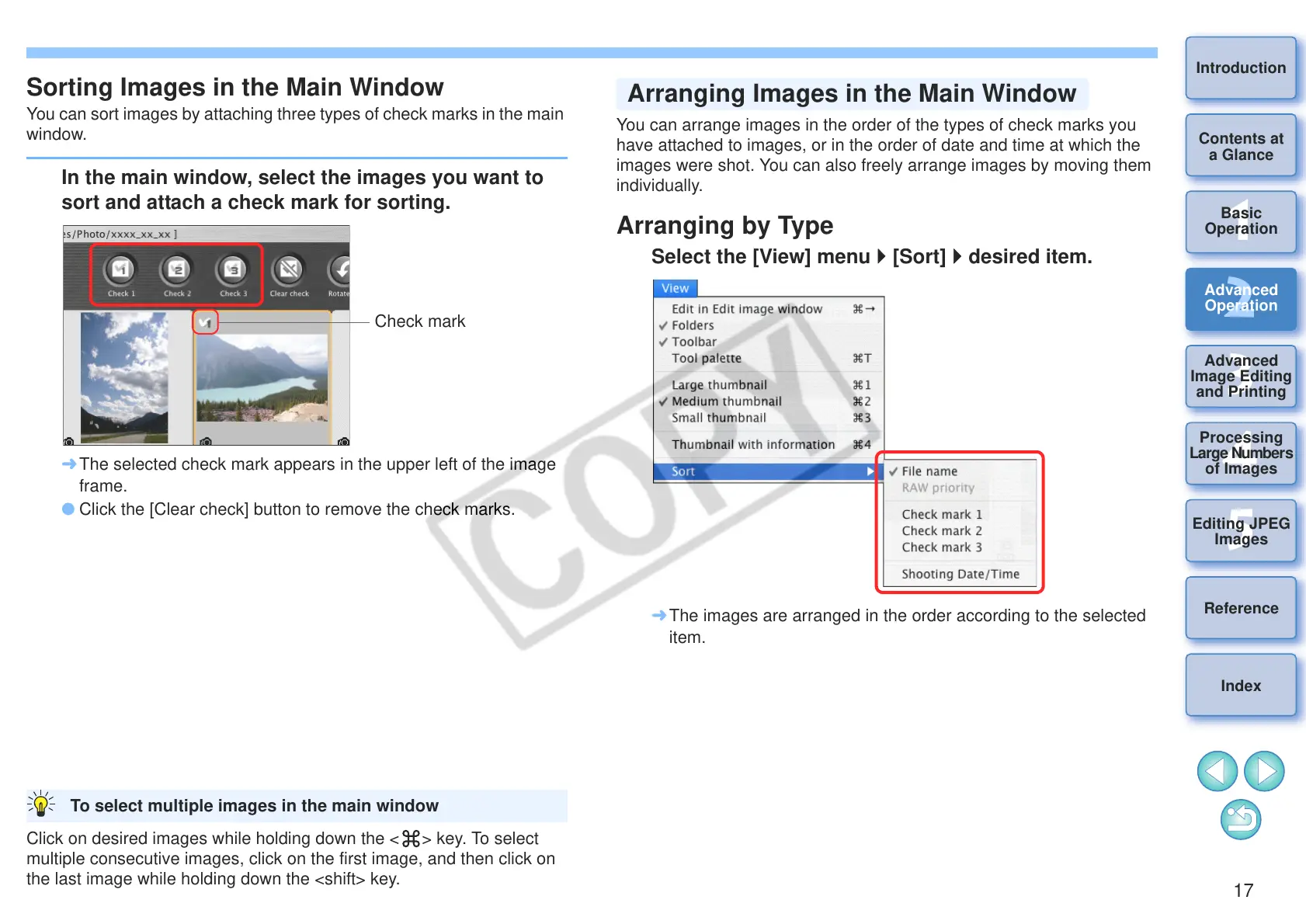
In the main window, select the images you want to
sort and attach a check mark for sorting.
¿ The selected check mark appears in the upper left of the image
frame.
O Click the [Clear check] button to remove the check marks.
Click on desired images while holding down the < > key. To select
multiple consecutive images, click on the first image, and then click on
the last image while holding down the <shift> key.
To select multiple images in the main window
You can arrange images in the order of the types of check marks you
have attached to images, or in the order of date and time at which the
images were shot. You can also freely arrange images by moving them
individually.
Arranging by Type
Select the [View] menu [Sort] desired item.
¿ The images are arranged in the order according to the selected
item.
Arranging Images in the Main Window










 To Next Page