Protocol Settings
5-21
5
Using a TCP/IP Network
In order to select [On] for <Use SSL> to allow SSL communication, a key pair is necessary. You can use
the preinstalled key pair, or generate an original key pair with the machine, to set as the default key. For
information on the default key, and instructions on how to generate an original key pair, see e-Manual >
Network.
8
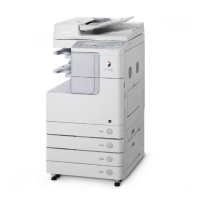
On the TCP/IP Settings screen, press [Multicast Discovery]
→
specify the
following.
[On] for <Response>: You can use device information from other devices, such as an Address Book or
Department ID Management settings, or respond to a multicast discovery from utilities.
Optionally, press [Scope Name] and enter the scope name for a multicast discovery.
For instructions on how to deliver and share device information, such as the Address Book and Department
ID Management settings with multiple devices, see e-Manual > Security.











 To Next Page