Protocol Settings
5-22
5
Using a TCP/IP Network
9
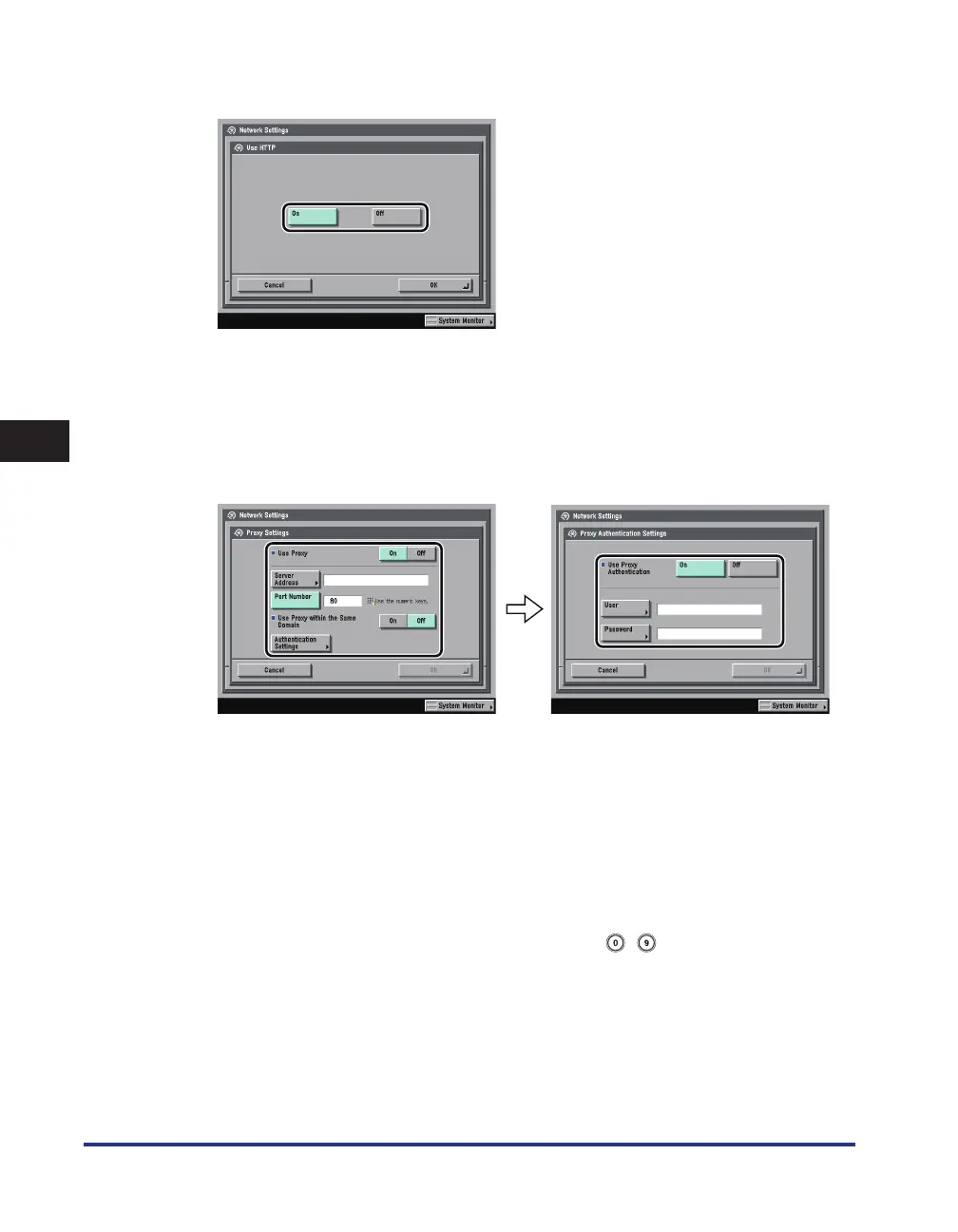
On the TCP/IP Settings screen, press [ Use HTTP ]
→
specify the following.
[On]: You can use the Remote UI or IPP.
Pressing [Off ] for [Use HTTP] automatically sets [Remote UI] (in the System Settings screen) and [IPP Print
Settings] to 'Off'.
10
On the TCP/IP Settings screen, press [ Proxy Settings ]
→
specify the
following.
In the following cases, specify the proxy settings, according to the network environment you are using:
If you are using the imageRUNNER 3245i/3235i, or the imageRUNNER 3245/3235/3230/3225 with the
optional PS Printer Kit
If you are using the optional Web Access Software (The Web Access Software is optional software
for viewing web pages on the touch panel display of the machine. For details, see e-Manual > Web
Access.)
If you connect the WebDAV client to the Internet via a proxy, when using a WebDAV server
In [ Server Address ], enter a proxy server IP address or FQDN (for example, starfish.company.com).
In [ Port Number ], enter the port number of a proxy server using
- (numeric keys).
If you want to use a proxy in the same domain, press [On] for <Use Proxy within the Same Domain>.
•
•
•















 To Next Page