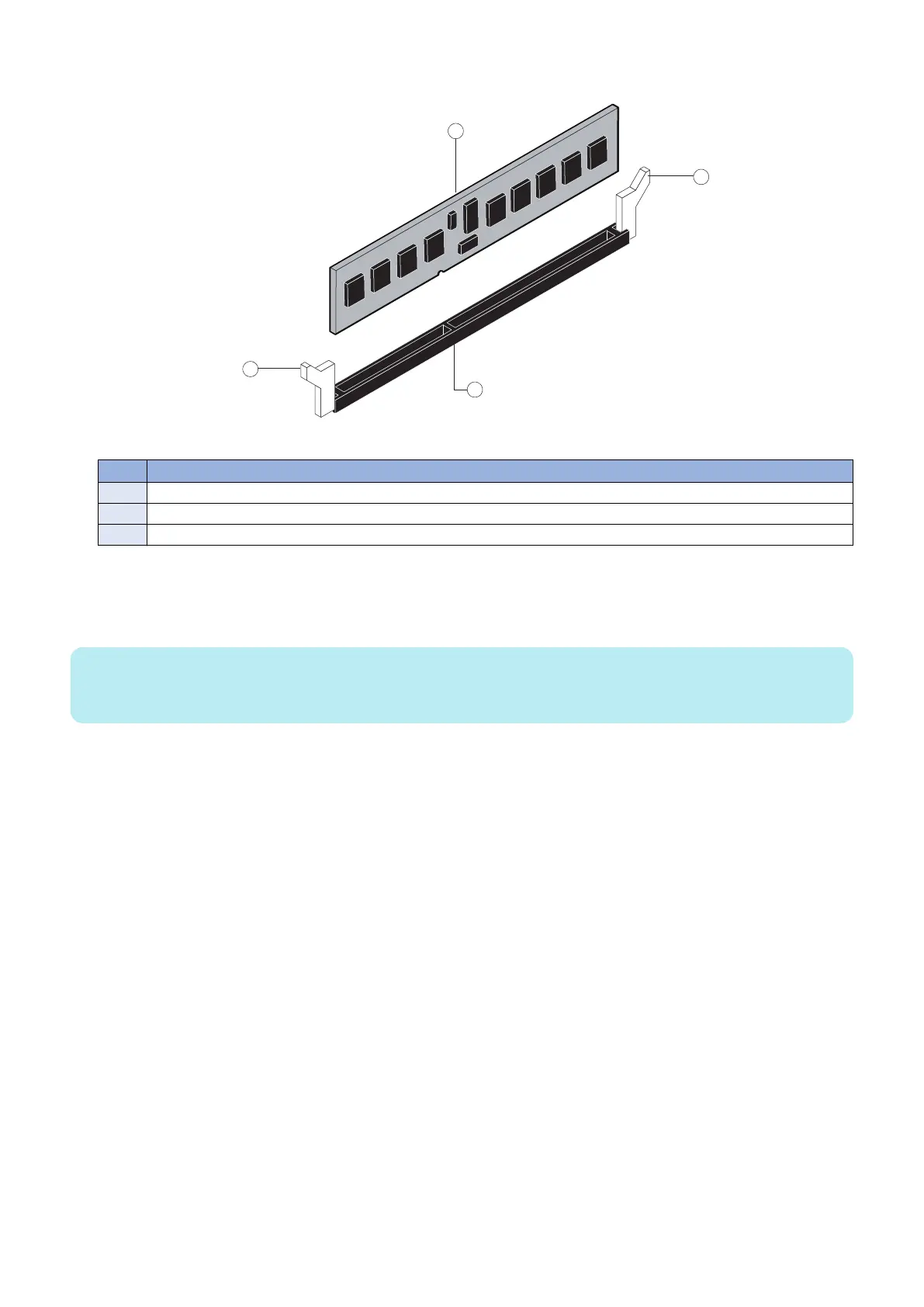
2. To release a DIMM, push outward on the levers on each side of the DIMM (see below figure).
Figure 11: Releasing a DIMM
No. Name
1 Lever
2 DIMM
3 Slot notch
3. Lift the DIMM straight out of the slot.
4. To replace a DIMM, position the DIMM in the DIMM-A0 slot and press the DIMM straight down into the slot, so that
the levers lock the DIMM into place (see above figure).
NOTE:
DIMM fits in the slot only one way. The notch on the bottom of the DIMM should line up with the notch in the slot. Make sure that
the levers close securely around the ends of the DIMM and that the DIMM is fully seated in its slot.
5. Reassemble the imagePRESS Server and verify its functionality (see “Restoring imagePRESS Server functionality
after service” on page 43).
■ Motherboard
This section describes the battery and default jumper settings on the imagePRESS Server motherboard, as well as procedures
for removing and replacing the motherboard.
● Battery
The battery is located on the motherboard. Spare batteries are not provided by your authorized service/support center.
If you must replace the battery, use a 3V manganese dioxide lithium coin cell battery (Panasonic CR2032 or equivalent).
3. REPLACING PARTS
23



 To Next Page