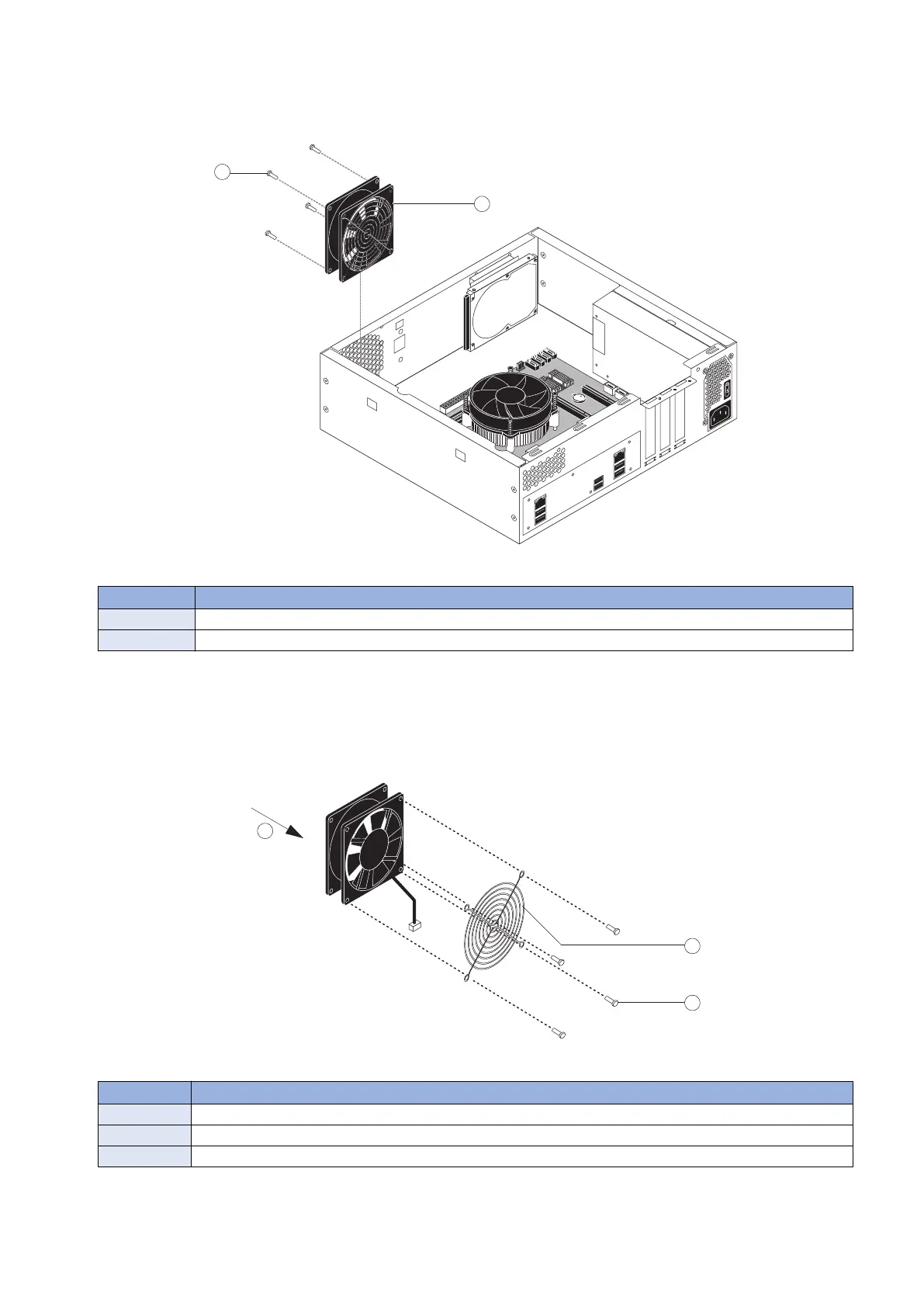
3. Remove the four plastic rivets that attach the fan to the chassis, and remove the fan.
To remove a rivet, use a flathead screwdriver to pry loose the rivet head on the outside of the chassis while squeezing and
pushing the locked end of the rivet with your fingers or a pair of pliers. Set the rivets aside so that you can replace them later.
Figure 22: Removing the chassis fan
No. Name
1 Rivet (1 of 4)
2 Chassis fan
4. If you are removing the chassis fan in order to replace it with a new one, remove the fan guard from the face of the
fan (see below figure).
To remove the plastic rivets that secure the fan guard to the fan, use a flathead screwdriver to pry loose the rivet head while
squeezing and pushing the locking end of the rivet with your fingers or a pair of pliers.
Set aside the fan guard and rivets so that you can install them later on the new chassis fan.
Figure 23: Removing/replacing the chassis fan guard
No. Name
1 Airflow direction
2 Fan guard
3 Rivet (1 of 4)
3. REPLACING PARTS
37



 To Next Page