24
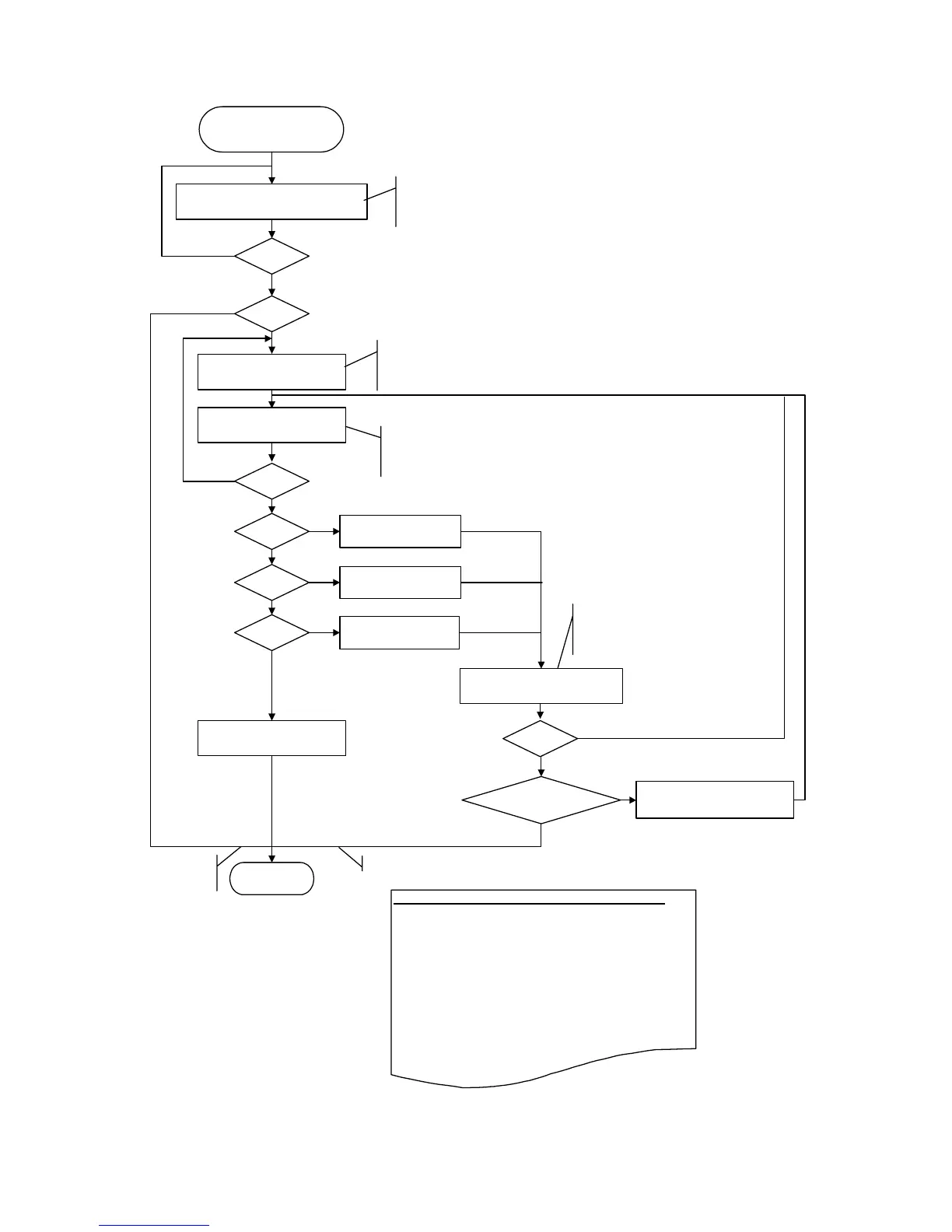
Press the Resume/Cancel button "N"
times, then press the Power button to
fix the selection.
Left margin correction
START
L = 0
Start of duplex printing from the
rear tray and cassette (key entry)
M = 0
M = 1
M = 2
M = 3
Yes
No
No
Yes
Yes
Yes
No
No
No (N >= 4)
Rear tray,
back side of paper
Cassette,
front side of paper
Cassette,
back side of paper
Selection of the left margin
correction value (key entry)
1 <= N <= 6
END
Yes
No (N >= 7)
L = 1
Yes
No (N >=2)
Duplex printing from the
rear tray and cassette
Parameter mode
selection (key entry)
Printing is performed according to
the current correction values in
the EEPROM.
Press the Resume/Cancel button "L"
times, then press the Power button to
fix the selection.
Press the Resume/Cancel button "M"
times, then press the Power button to
fix the selection.
Yes
N = 0
No
Yes
Setting of the selected left
margin correction value
Writing of the correction
value to the EEPROM
No writin
to the EEPROM.
No writing to
the EEPROM.
Key entry (number of times the button is pressed):
0 times:
The previous entry was wrong.
Return to the previous step.
Specified number:
Set the specified value.
Over the specified number:
Exit the left margin correction mode.
Before writing to the EEPROM, values in the RAM area
can be overwritten by using key entry.










 To Next Page