Display Area Information Displayed
R Bottom illustrations
Illustrations indicate the feed source, orientation, borderless printing selection, and other set-
tings information.
Note
• To confirm the Print Target specified in Easy Settings, click G View Settings on the Main sheet to display the
View Settings dialog box.
•
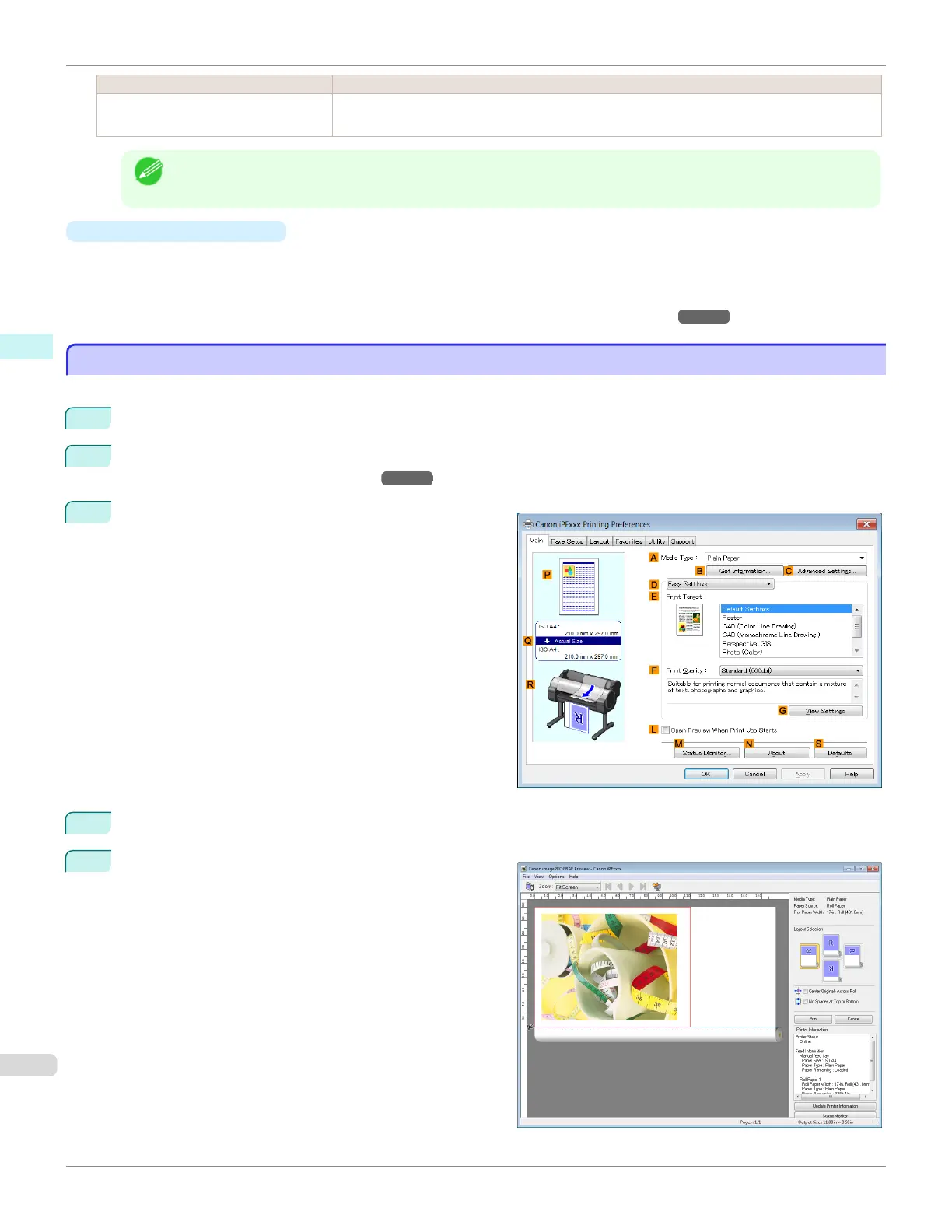
Checking a print preview
You can check an image of the original just as it will be printed.
When you activate this feature, imagePROGRAF Preview or PageComposer is started before printing. Confirm-
ing how documents will be printed this way helps prevent printing errors.
For details on print previews, see "Checking the Layout in a Preview Before Printing." ➔ P.144
Checking the Layout in a Preview Before Printing
Checking the Layout in a Preview Before Printing
This topic describes how to preview images of print jobs before actually printing them.
1
Choose Print in the application menu.
2
Select the printer in the dialog box, and then display the printer driver dialog box. (See "Accessing the Printer
Driver Dialog Box from Applications .")
➔P.164
3
Make sure the Main sheet is displayed.
4
Select the L Open Preview When Print Job Starts check box.
5
After you click OK, when you print a job, the image-
PROGRAF Preview window will be displayed.
Checking the Layout in a Preview Before Printing
iPF685
User's Guide
Windows Software Printer Driver
162













 To Next Page