Print Area
Print Area
A margin required by the printer is added with respect to the size of paper loaded in the printer. Except in borderless
printing, the actual printing area corresponds to the paper size minus the space for this margin.
Note
• Printable Area: The area that can be printed.
• There is no margin (that is, a margin of 0 mm) during borderless printing on rolls.
• Recommended Print Area: We recommend printing within this area.
• To print so that your original matches the print area exactly, use an oversized paper size that includes the required
margin. (See "Printing on Oversize Paper.") ➔ P.76
Margins of Printable Area Margins of Recommended Print Area
Top Edge Bottom Edge Sides Top Edge Bottom Edge Sides
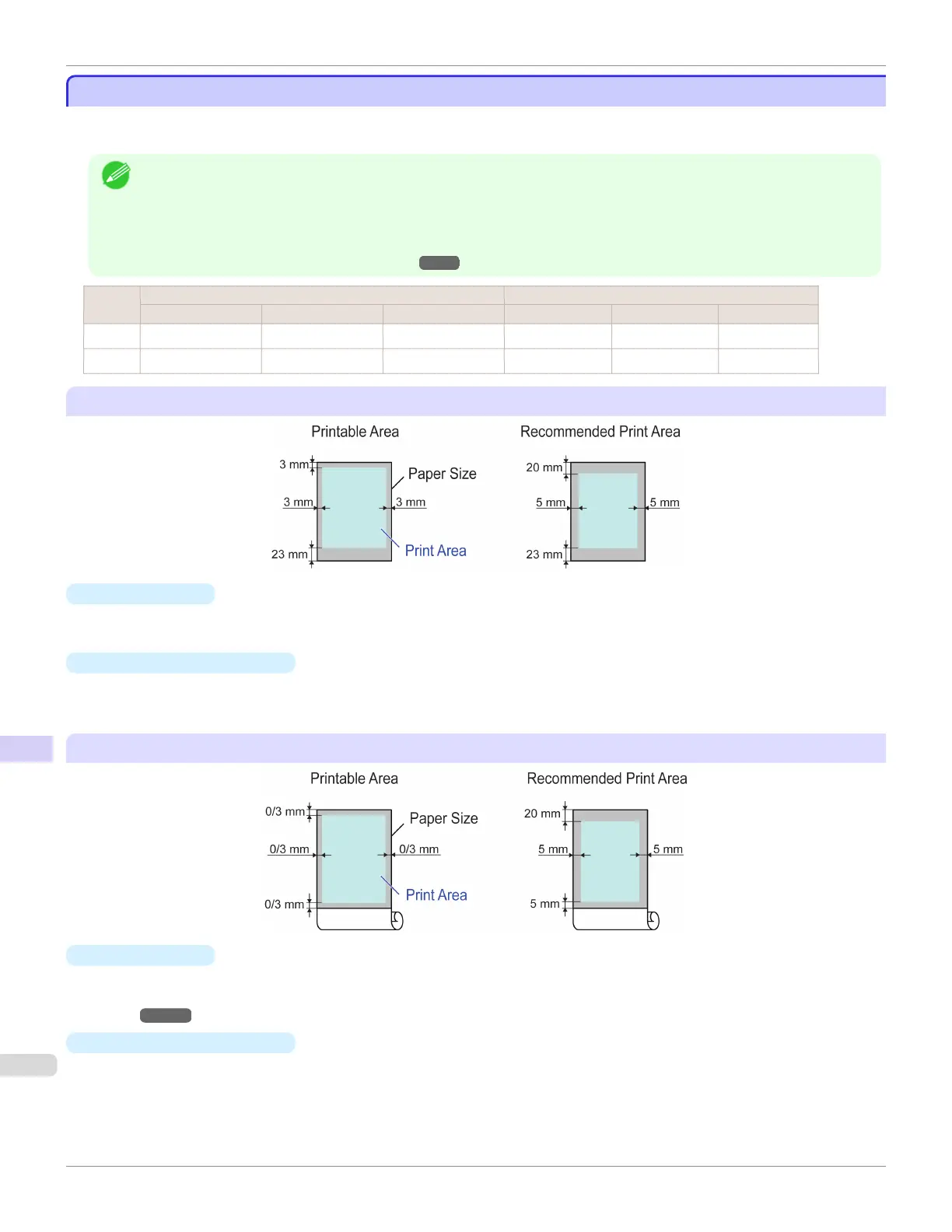
Sheets 3 mm (0.12 in) 23 mm (0.91 in) 3 mm (0.12 in) 20 mm (0.79 in) 23 mm (0.91 in) 5 mm (0.20 in)
Rolls 0/3 mm (0/0.12 in) 0/3 mm (0/0.12 in) 0/3 mm (0/0.12 in) 20 mm (0.79 in) 5 mm (0.20 in) 5 mm (0.20 in)
Sheets
•
Printable Area
a margin of 3 mm (0.12 in) on top, 23 mm (0.91 in) on bottom, and 3 mm (0.12 in) on left and right sides is re-
quired.
•
Recommended Print Area
A margin of 20 mm (0.79 in) on top, 23 mm (0.91 in) on bottom, and 5 mm (0.20 in) on left and right sides is re-
quired.
Rolls
•
Printable Area
A margin of 3 mm (0.12 in) on all sides is required. During borderless printing, the margin on all sides is 0 mm. For
information on paper compatible with borderless printing, see the Paper Reference Guide. (See "Types of Pa-
per.") ➔ P.362
•
Recommended Print Area
A margin of 20 mm (0.79 in) on top, 5 mm (0.20 in) on bottom, and 5 mm (0.20 in) on left and right sides is re-
quired.
Print Area
iPF685
User's Guide
Specications Printer Specications
684













 To Next Page