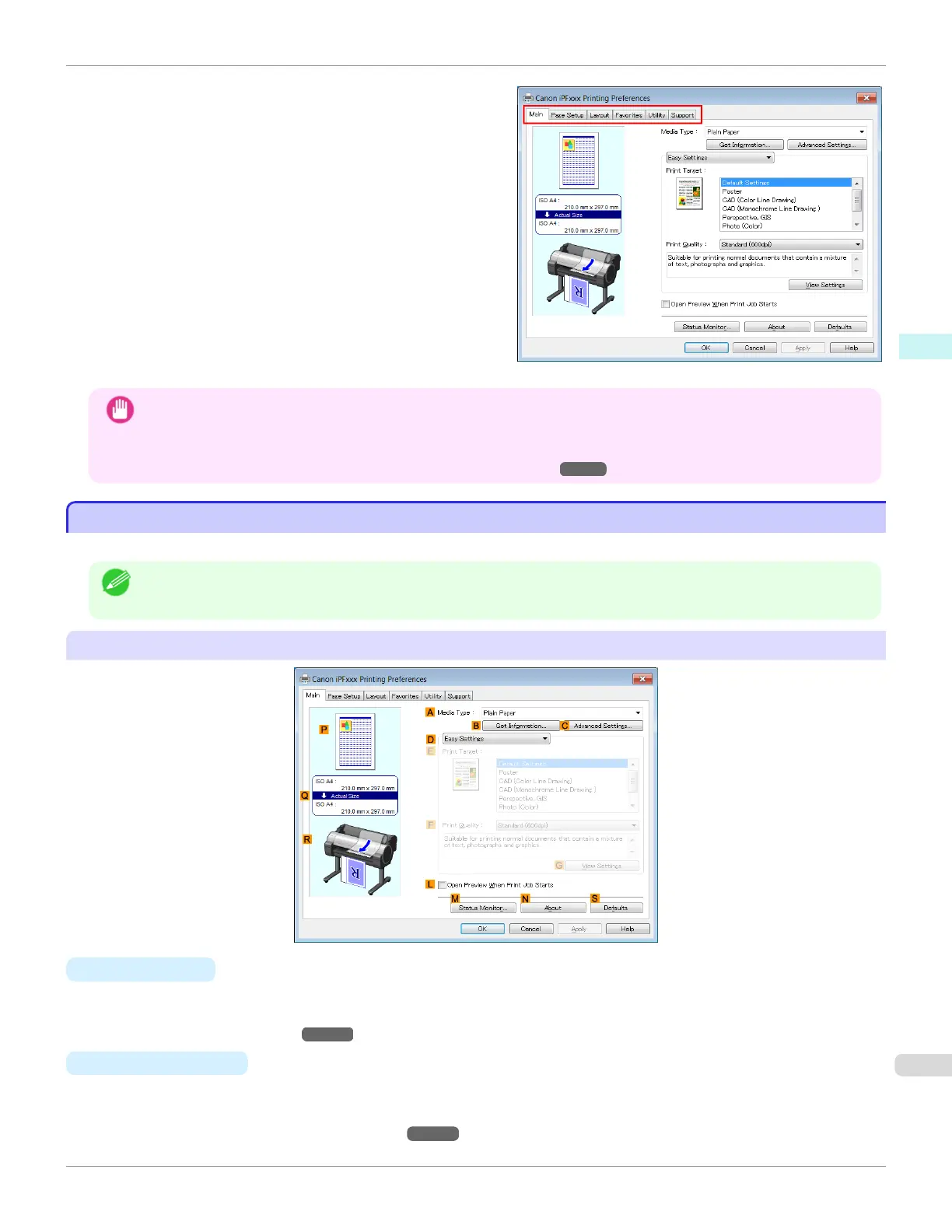
Six sheets of print settings are displayed by the printer
driver: Main, Page Setup, Layout, Favorites, Utility,
and Support.
Important
• If you access the printer driver dialog box from the operating system menu, changes you make to the settings will
apply to all applications you use for printing.
• You can also access the printer driver dialog box from applications.
(See "Accessing the Printer Driver Dialog Box from Applications .") ➔ P.164
Main Sheet
Main Sheet
The following settings are available on the Main sheet. For details on settings items, refer to the printer driver help file.
Note
• On the Main sheet, choose Easy Settings to specify basic print settings based on the particular printing application, or
switch to Advanced Settings to complete more detailed settings as desired.
Common Items
• A
Media Type
Select the type of paper.
For information on the types of paper the printer supports, refer to the Paper Reference Guide. (See "Displaying
the Paper Reference Guide.") ➔ P.365
• B
Get Information
Displays Paper Information on Printer. You can update the printer driver settings for the feed source, media
type, and roll width by selecting the feed source.
•
Paper Information on Printer Dialog Box ➔ P.170
iPF685
Main Sheet
User's Guide
Windows Software Printer Driver
167













 To Next Page