Important
• If you want to change the display to another file or application while the Printing Wizard is open, close the
Printing Wizard dialog box. Otherwise, you may not be able to change displays or operate the toolbar/
ribbon.
4
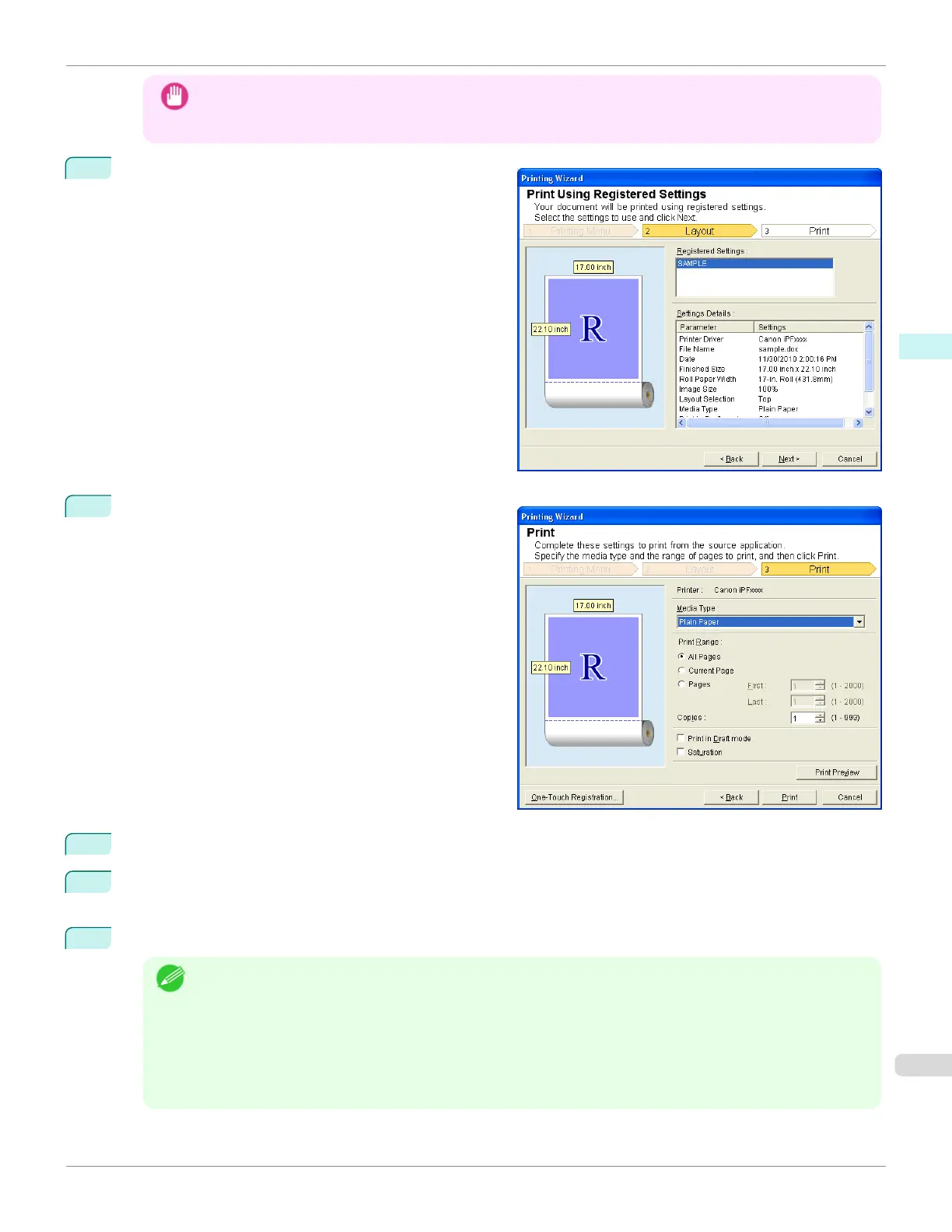
Click Print Using Registered Settings.
5
Click the Nextbutton.
6
Select Media Type.
7
Select Print Range from All Pages, Current Page, or Pages.
If Pages is selected, enter the number of pages.
8
Enter Copies.
Note
• When Print in Draft mode is selected, printing is fast but the print quality is poor.
• When Saturation is selected, you can print posters, etc., vividly.
• Press the Print Preview button to display the preview screen. You can check and make changes to the layout
in the preview screen.
•
The maximum print length when printing with the registered settings is the lesser of 5.587 times the roll paper
width, or 18.0m.
iPF685
Print Using Registered Settings(Word)
User's Guide
Windows Software Print Plug-In for Oce
253













 To Next Page