2
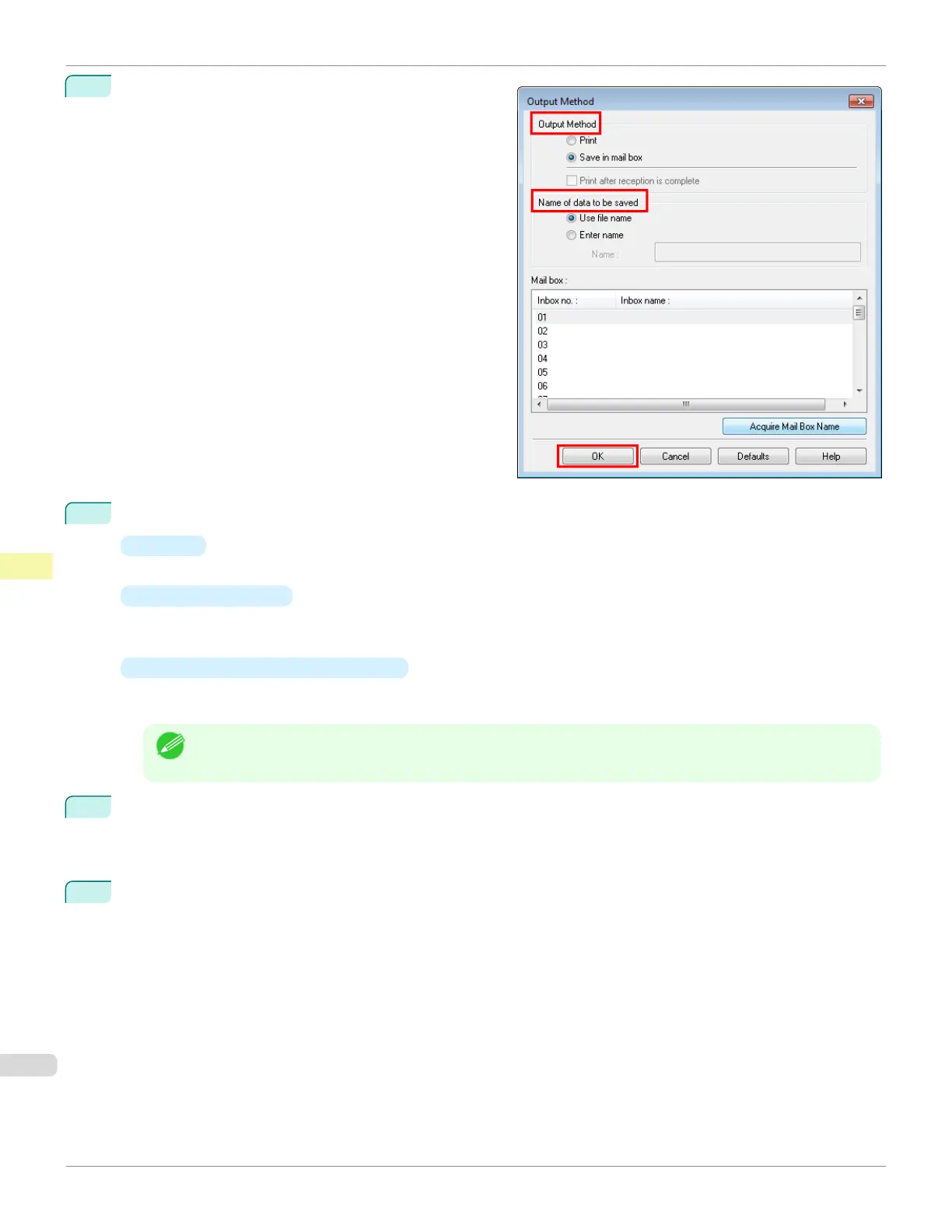
Click Output Method to display the Output Method di-
alog box.
3
Make your selection in Output Method.
•
Print
Save print jobs on the printer's hard disk after printing.
•
Save in mail box
Save print jobs on the printer's hard disk.
If you choose Save in mail box, also specify the destination personal box in the Mail box list.
•
Print after reception is complete
This option is available in combination with Print. You can prevent degradation of print quality that occurs
when receiving a print job is interrupted and printing is aborted in the middle.
Note
• Click Acquire Mail Box Name to display personal box names in the Mail box list, as acquired from the print-
er.
4
In Name of data to be saved, specify how to name saved print jobs.
•
To use the file name, choose Use file name.
•
Otherwise choose Enter name and enter a name in Name.
5
Click OK to close the Output Method dialog box.
Saving Print Jobs on the Printer Hard Disk
iPF685
User's Guide
Print Job Management Basic Print Job Operations
534













 To Next Page