This function will not work correctly if you use refill ink tanks. As a result, printing stops. Thus, before using refill ink
tanks, you must cancel the ink level detection.
Printing with the ink level detection canceled may lead to printer damage and printing problems. Canon Inc. is not liable
for any damage that may occur as a result of refilling ink.
Important
• After ink level detection has been released, this function cannot be reactivated for currently loaded Ink Tank. To use
ink level detection again, replace the Ink Tank with new ones specified for use with the printer.
• Repeatedly removing and inserting an Ink Tank may damage the connection between the Ink Tank and the printer,
which may cause ink leakage from the Ink Tank and damage the printer.
Releasing ink level detection
1
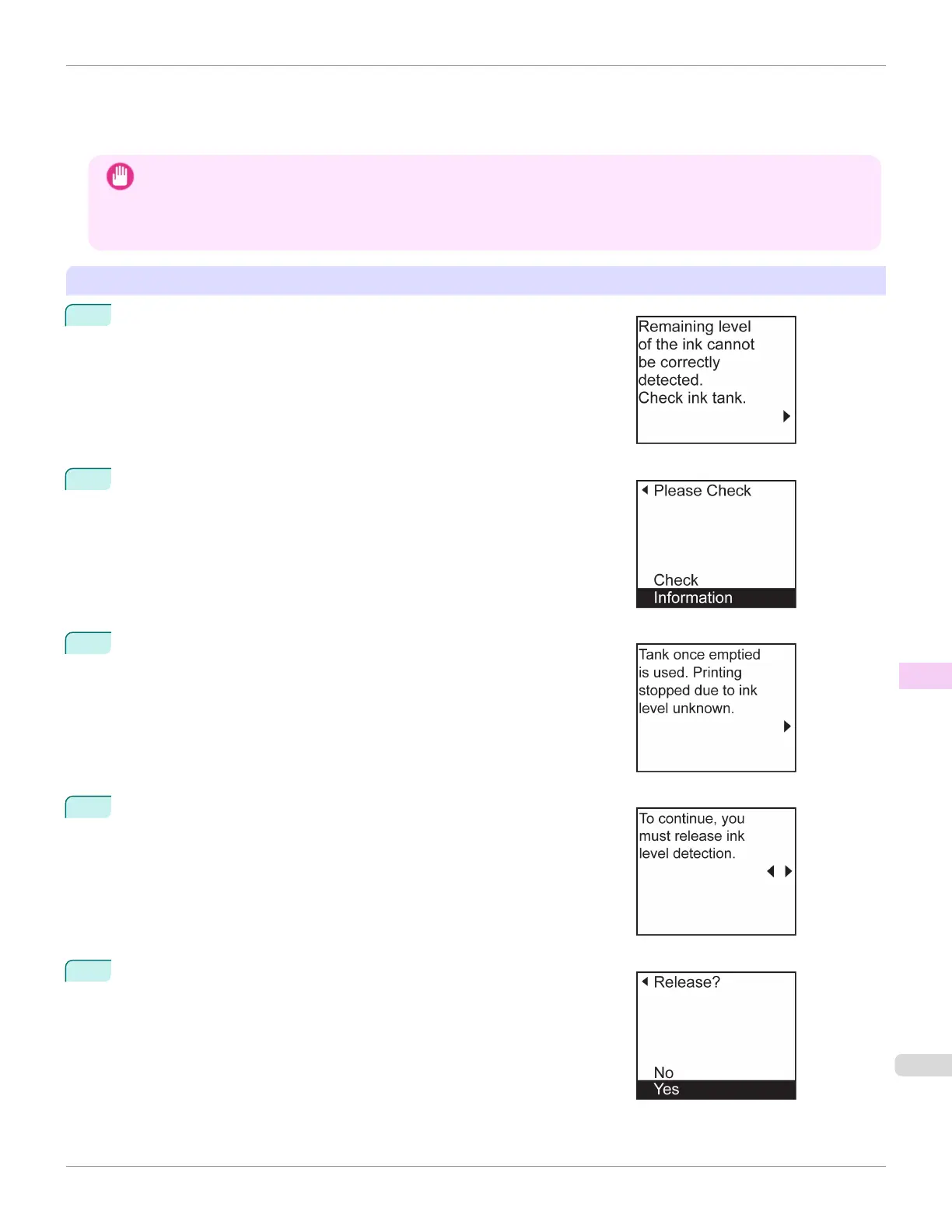
On the Display Screen, a message indicates that the ink level cannot be
detected. After checking the message, press the ▶ button.
2
Press ▲ or ▼ to select Information, and then press the OK button.
3
A confirmation message is shown on the Display Screen about releasing
ink level detection. After checking the message, press the ▶ button.
4
After checking the message, press the ▶ button.
5
Press ▲ or ▼ to select Yes, and then press the OK button.
iPF685
Ink Level Detection
User's Guide
Troubleshooting Other problems
655













 To Next Page