7-19
Cleaning the Fixing Roller
7
Routine Maintenance
Cleaning the Fixing Roller
When the front or back of the printed paper has smudge marks, clean the fixing
roller using the following procedure. Print quality deterioration can be prevented by
cleaning the fixing roller.
IMPORTANT
•
The cleaning paper cannot be printed on any paper other than A4/Letter. Be sure to use
A4/Letter size paper.
•
To print a cleaning paper, load a sheet of A4/Letter size paper in the multi-purpose tray.
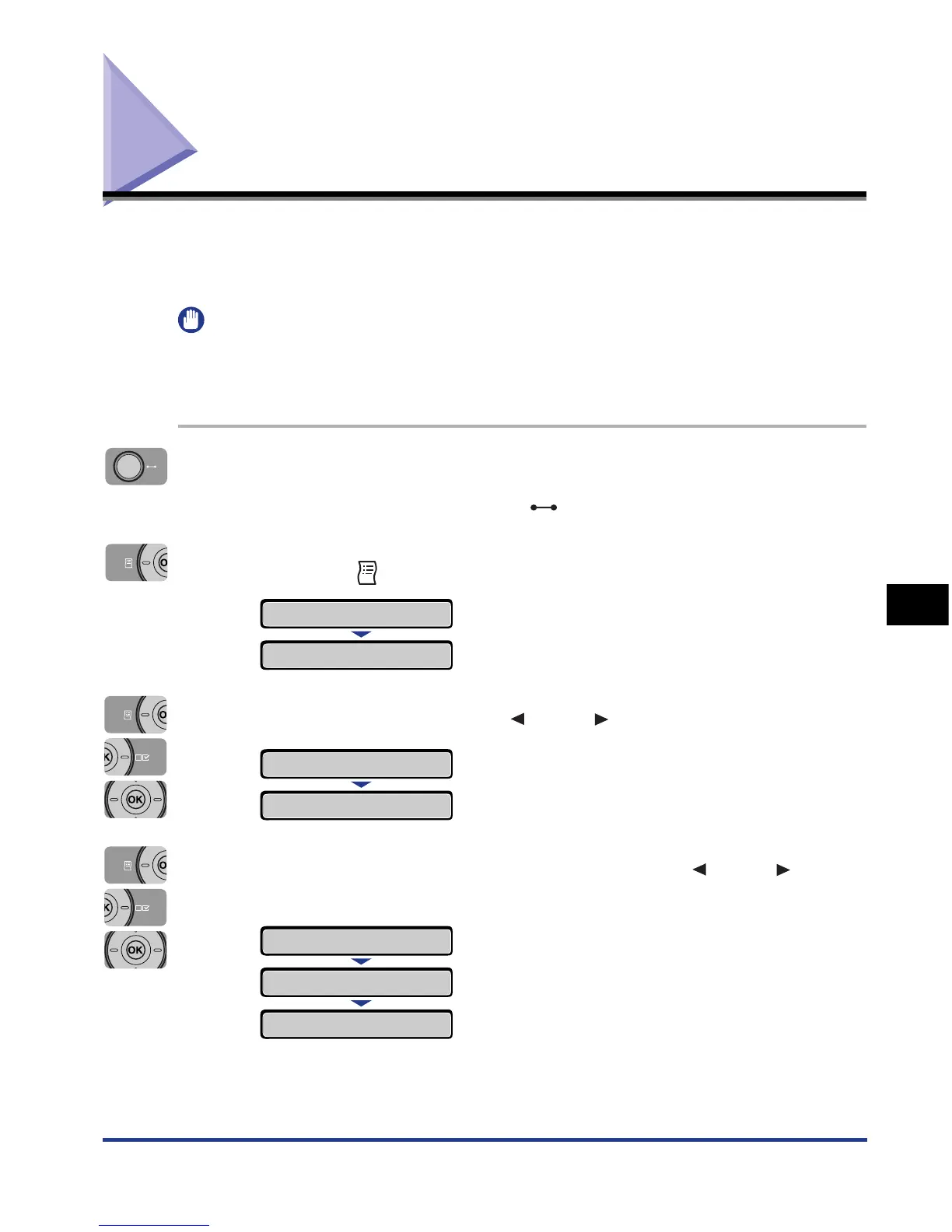
1
Make sure that the printer is online.
If the printer is not online, press the (Online) key.
2
Press the (Utility) key.
3
Select CLEANING using [ ] and [ ], then press [OK].
4
Select the size of the cleaning paper using [ ] and [ ], then
press [OK].
<CLEANING PAPER> appears in the display, and the printer waits to print the
cleaning paper.
UTILITY MENU
CONFIG.PAGE
→
CLEANING
→
A4
→
A4
→
EXECUTING
CLEANING PAPER













 To Next Page