8-7
Tr oubleshooting
8
Paper Jams
Paper Jam Area
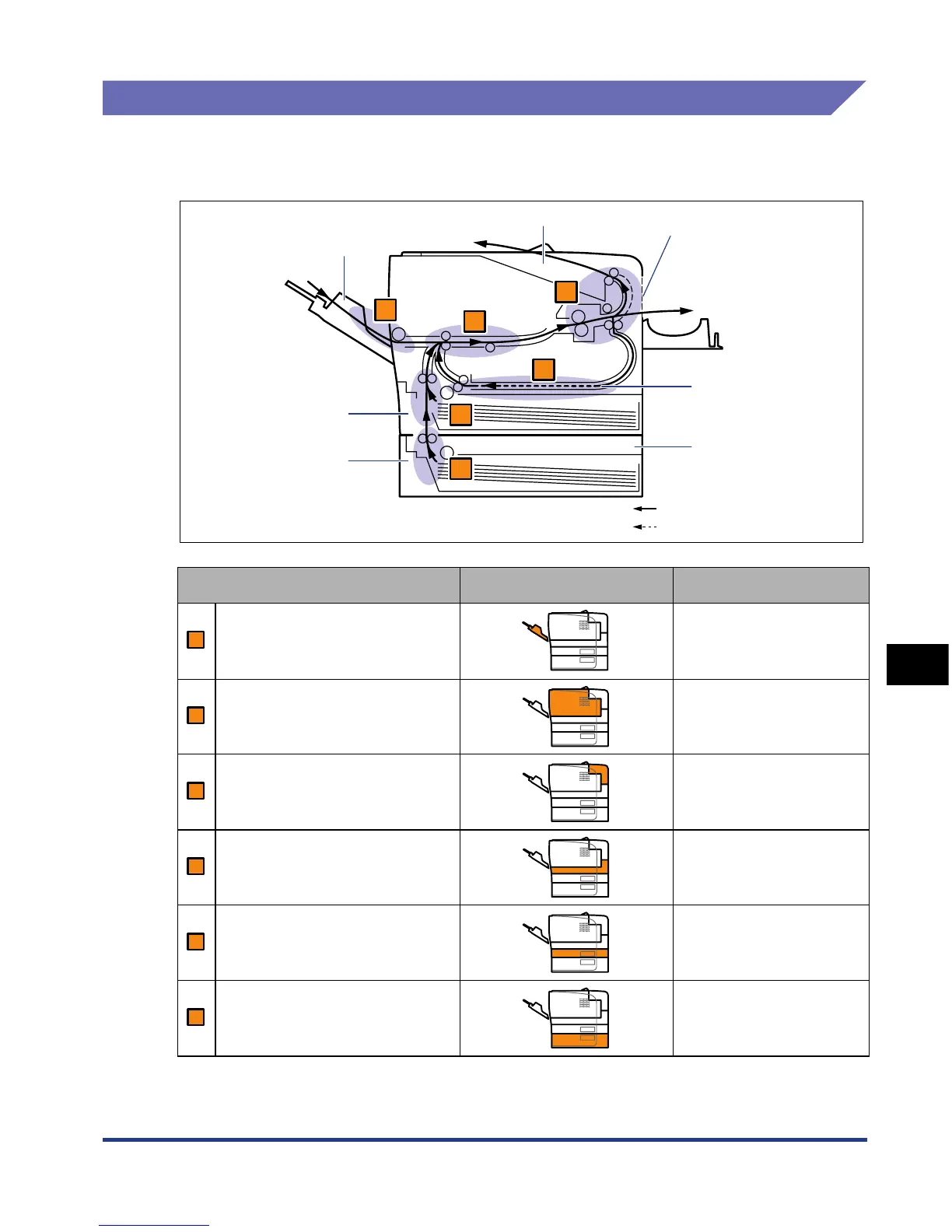
The message that appears in the display shows the location where the paper jam
occurred.
* In "Procedure for Clearing Paper Jams" (See p. 8-8), this mark is attached to the left of each step, indicating the
paper jam area where the operation described in the step is required.
Paper Jam Area Paper Jam Area Mark* Message
Multi-purpose tray <TRAY AREA>
Inside the front cover <FRONT COVER>
Face-up output slot <S-OUTPUT AREA>
Duplex print transport area <DUPLEX UNIT>
Cassette 1 <CASS.1 AREA>
Cassette 2 (Only when the
paper feeder is installed)
<CASS.2 AREA>
Paper Feeder Unit
(Optional)
Cassette 1
Cassette 2
Paper flow for 1-sided printing
Paper flow for 2-sided printing
Face-down Output Tray
Face-up Output Slot
Multi-purpose Tray
Duplex Print
Transport Area
A
B
C
D
E
F
A
B
C
D
E
AF













 To Next Page