Turning the Printer ON and Checking the Printer Operation
2-38
Installing the Printer
2
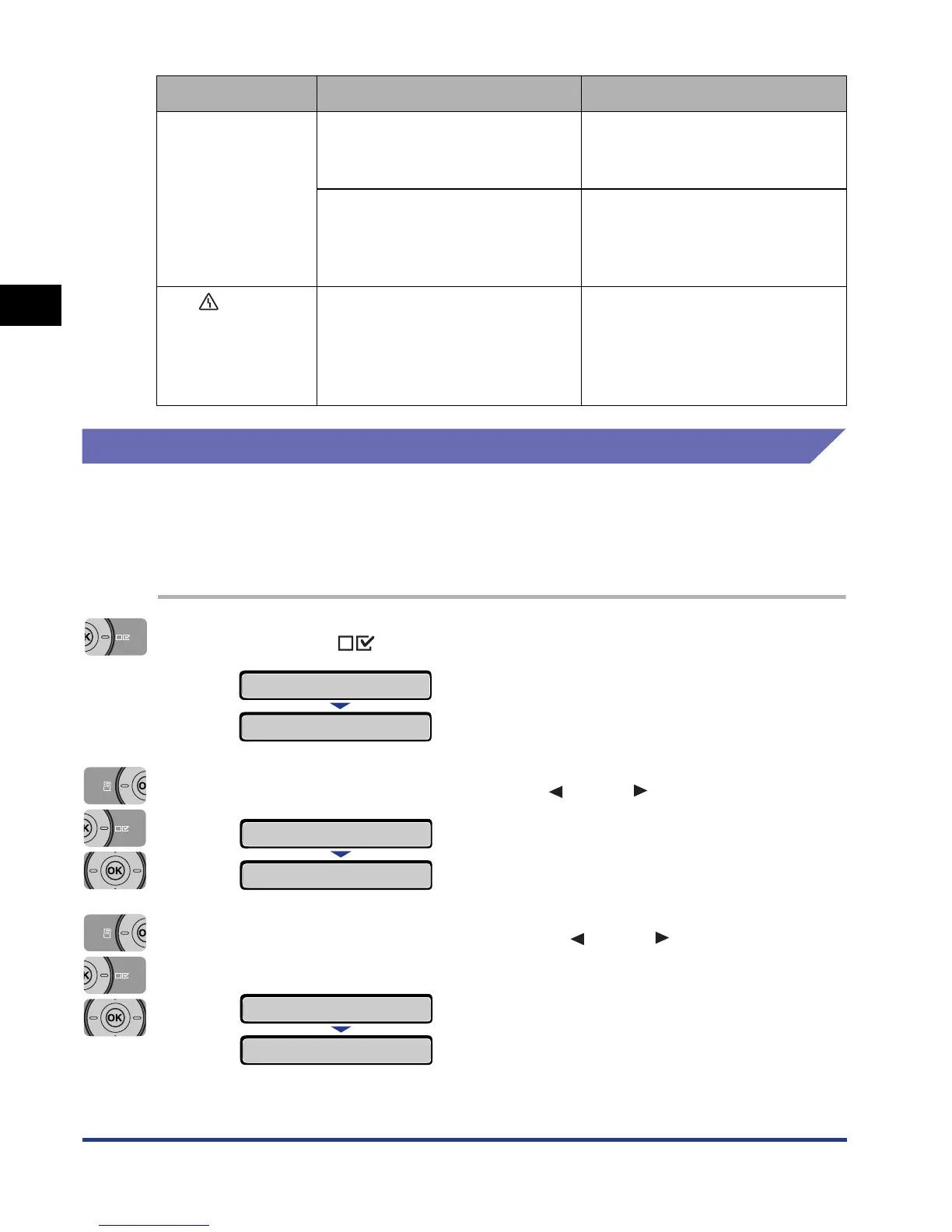
Changing the Language Used in the Display
The default value of the language used in the display is [ENGLISH].
You can change the display language to FRENCH, GERMAN, ITALIAN, or
SPANISH using the following procedure.
1
Press the (Settings) key.
2
Select CONTROL MENU using [ ] and [ ], then press [OK].
3
Select PANEL LANGUAGE using [ ] and [ ], then press
[OK].
Nothing is printed
on the paper.
Multiple sheets of paper were fed
at a time.
Align the paper stack in the paper
cassette properly and load it
again.
The toner cartridge was installed
with the sealing tape still
attached.
Take the toner cartridge out of the
printer, pull out the sealing tape,
and then reinstall the toner
cartridge.
The (Message)
indicator is on and
a message is
displayed in the
display.
Some problem has occurred.
See "Message List" (p. 8-26) and
solve the problem.
Symptom Cause Remedy
SETUP
CONTROL MENU
→
POWER SAVE MODE
→
CONTROL MENU
→
PANEL LANGUAGE
→
=ENGLISH
→













 To Next Page