Installation
2
26 27
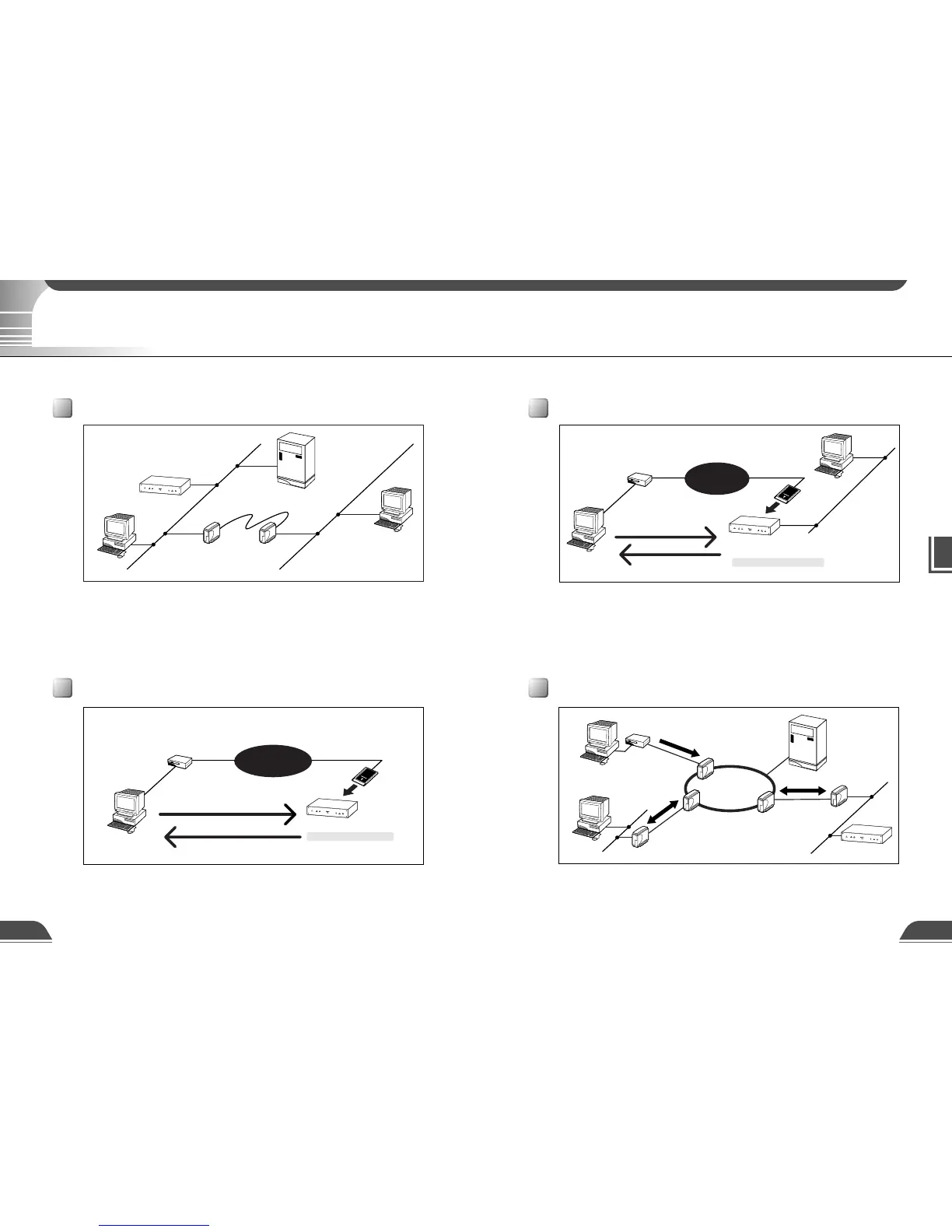
This example shows the VB101 connected to a LAN and a dial up environment. Video images
can be used by viewers in the same Ethernet segment as the VB101, viewers who can access
the segment, or by viewers which can dial up to the VB101 with a modem.
Public switched
telephone network
Call 123-4567
192.168.101.2 is set.
VB101
Modem card
Viewer PC
Modem
PPP local : 192.168.101.1
PPP remote : 192.168.101.2
IP 192.168.100.1
IP 192.168.100.2
Viewer PC
Router Router
VB101
Viewer PC
Viewer PC
Server
Provide the appropriate
server as required:
● HTTP (WWW)
● SMTP (mail)
● Syslog (log)
● BOOTP
Call 123-4567
192.168.101.2 is set.
VB101
Modem card
Insert modem card.
Viewer PC
Modem
PPP local : 192.168.101.1
PPP remote : 192.168.101.2
Public switched
telephone network
LAN plus Dialup Environment
Sample Network Configurations
This section describes some typical installation modes for the VB101.
Sample LAN Environment Configuration
Sample Dialup Environment Configuration
This example shows the VB101 connected to a LAN by Ethernet. In this configuration, video
images can be used by viewers in the same Ethernet segment as the VB101 and by viewers with
access to that segment.
To send log information such as faults and access statuses by e-mail and save that information to
another computer, an SMTP server or a Syslog server is required.
To automatically assign an IP address for the VB101, a BOOTP server is required.
This example shows the VB101 connected in a dialup environment. In this configuration, video
images can be accessed by viewers which can dial up to the VB101 using a modem.
In this situation, a modem card must be inserted into the card slot (use a recommended modem
card). PPP (Point to Point Protocol) is used as the network protocol. For information on settings,
refer to Chapter 3 (→ P.39).
Sample Network Configurations
Internet
Router
Modem
Router
Client receiving
images
Server sending
images
VB101
Viewer PC
Viewer PC
Servers
Provide the appropriate
server as required:
● HTTP (WWW)
● SMTP (mail)
● Syslog (log)
ISDN/
leased line, etc
Analog line
ISDN/
leased line, etc
Sample Configuration in an ISP Environment
This example shows an environment in which the VB101 is connected to an ISP (Internet service
provider). In this configuration, video images is used by viewers capable of accessing the ISP.
Bidirectional communication is possible between the VB101 and the ISP, and a fixed IP address
must be set for the VB101.



 To Next Page