Creating Web Pages
4
58 59
Viewer Name
Functions
LiveApplet
Displays video images from the camera server.
Allows camera control.
Allows overlays and superimposition of bitmaps in the video frame.
Because video is not displayed until the viewer has finished
downloading, video display takes longer than with the Helper Viewer.
Glimpse
Allows the video transmission interval to be set.
Downloading is fast because it has only simple functions and is small.
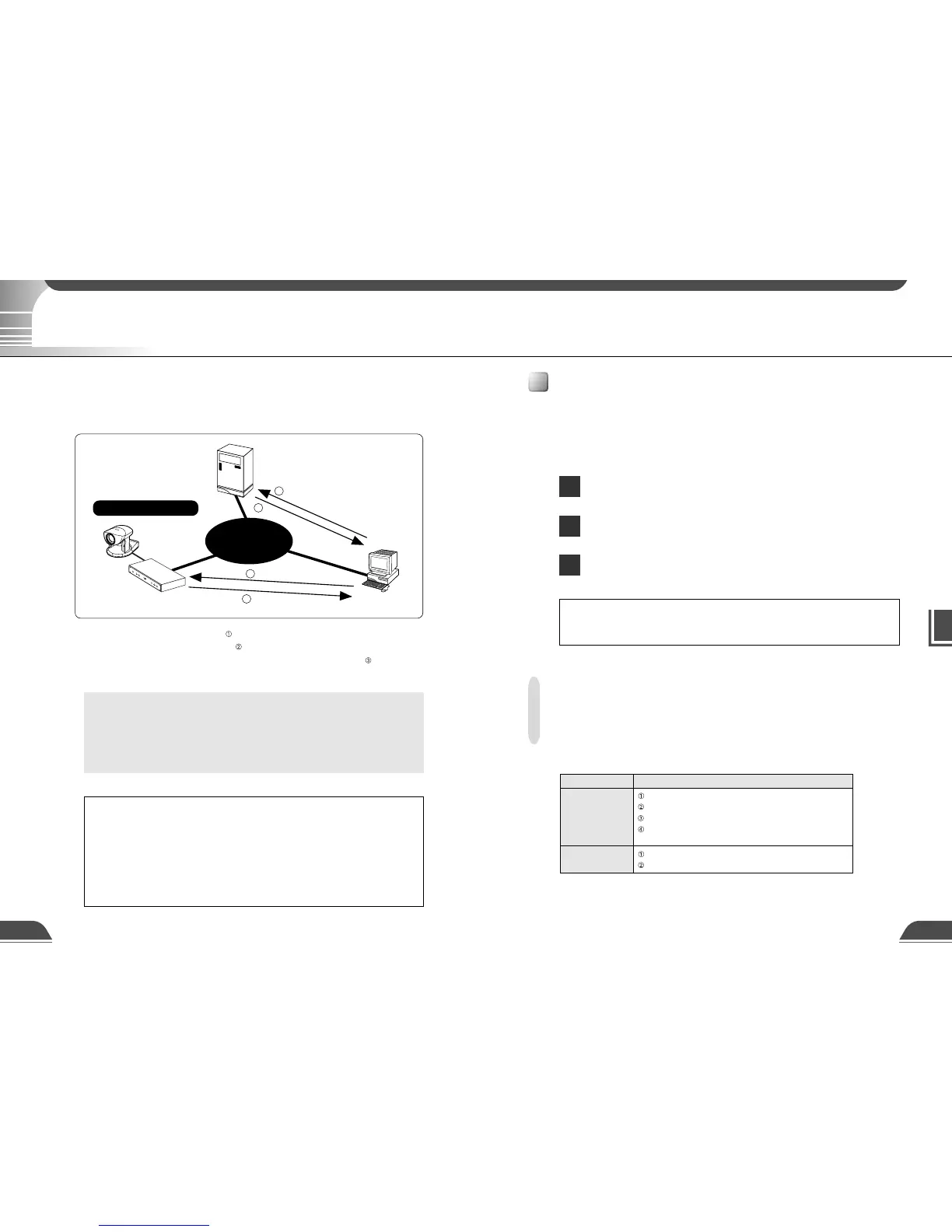
HTTP (WWW) server
Dedicated
Web server or VB101
Viewer PC
1 Access to Web pages
3 Request for video
4 Video transmission
2 IP address information notification
Internet
VC-C4
COMMUNICATION CAMERA
f:4-64mm 1:1.4-2.8
VB101
Web Pages for Video Transmission
To transmit picture data by VB101, you create a dedicated web page. The viewers that can be used with
the VB101 are "Java Viewer (with or without camera control function)" and "Helper Viewer", and detailed
parameters can be specified for each of these. The person sending the data determines which of these
viewers is supported and must create the Web page for the viewer.
c
Note
● File Names
The VB101 can handle file names consisting of up to 8 characters followed
by a 3-character extension. Note that the names of applets built into the
VB101 are exceptions to this rule.
● Refer to step 3 on P.25 for information on saving content.
Features of the Java Viewers
These viewers are supplied as Java applets. They run on Web browsers that are Java-capable,
such as the Netscape Navigator and Microsoft Internet Explorer browsers. The applets are
downloaded from the camera server to the Web browser and are then run by the Web browser. The
features of the Java Viewers are described below.
Video transmission and camera operation using the WebView-HTTP
protocol. Penetrate firewalls to access external sites.
Because they are automatically downloaded, the Java Viewers do not
need to be pre-installed by the client.
Java Viewers run on a wide variety of platforms .
Java Viewer Types
Two Java Viewers are "LiveApplet", which has video display and camera control functions, and
"Glimpse", which only has video display functions. Because both viewers use WebView-HTTP as
the transfer protocol, they do not require special settings to penetrate firewalls.
■Viewer Types
e
Tip
Because the Java applets are downloaded using the HTTP protocol when the
viewer starts up, the start up time is longer than the Helper Viewer.
If you select a link requesting video in step
, a file that includes the IP address information for the
VB101 is sent from the Web server in step . If you are using the Java version, the applet is
downloaded to the viewer PC from the VB101 in response to the request in step
and the video
request is then initiated.
Web Pages for Video Transmission
e
Tip
You can use the Language setting function for the Browser to create a multi-
lingual Web site. For example, if you set the French-language top page as
index-fr.htm and the English-language top page as index.htm and supply
users with a URL address terminates in slash, such as http://vb101/sample/,
the server will transmit a file that corresponds with the language setting for
the Browser. For further information on the Language setting function for the
Browser, refer to the Browser Help.



 To Next Page