Manual
11
Loading of transfer ribbon
Note: For the thermal transfer printing method it is necessary to load a ribbon, otherwise when
using the printer in direct thermal print it is not necessary to load a ribbon. The ribbons
used in the printer have to be at least the same width as the print media. In case the
ribbon is narrower than the print media, the printhead is partly unprotected and this could
lead to early wear and tear.
If it is printed with transfer ribbon, the photocell must be set on Reflexion (default and/or
factory setting).
Advice: As for the electrostatic unloading the thin coating of the thermal printhead or other
electronic parts can be damaged, the transfer ribbon should be antistatic.
The use of wrong materials can lead to printer malfunctions and the guarantee can expire.
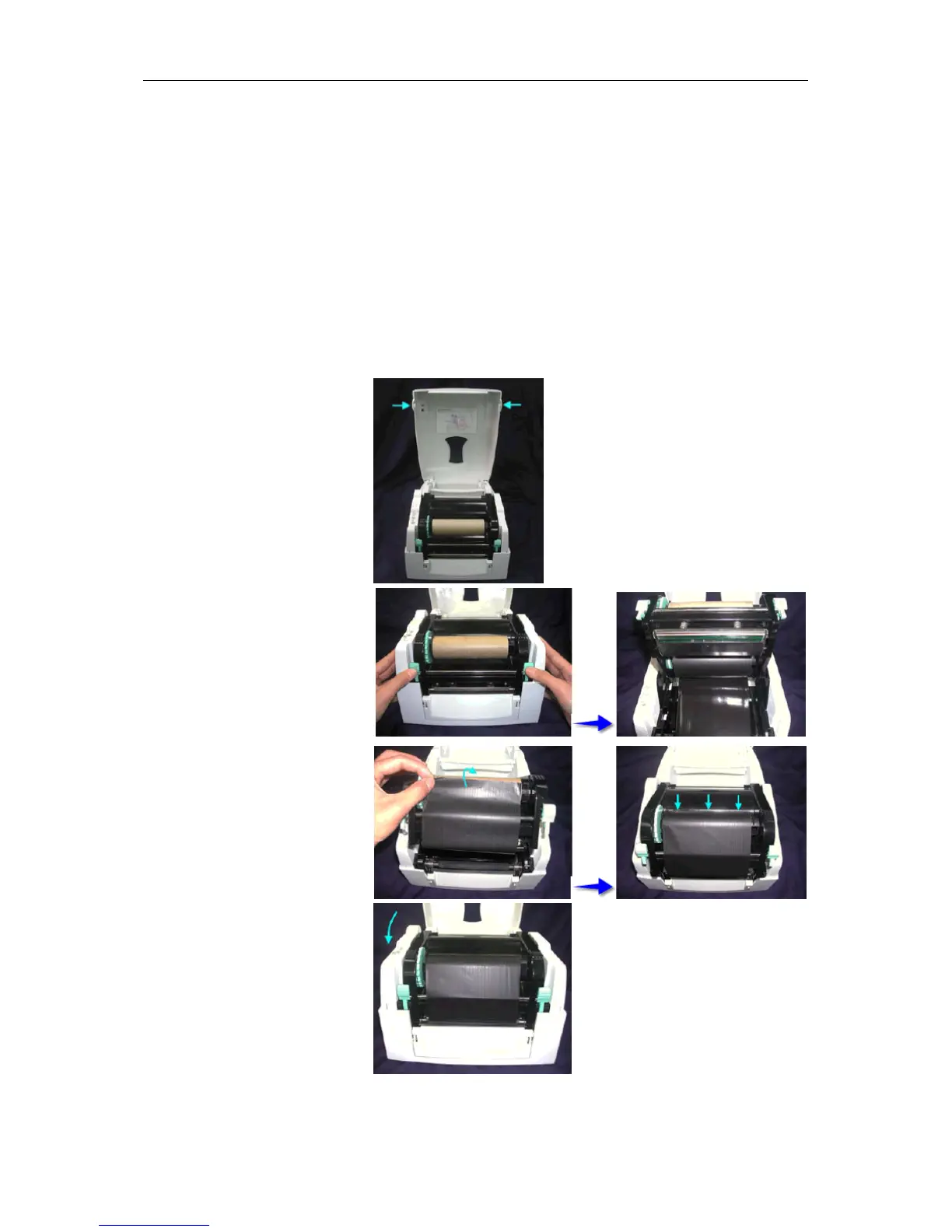
Place the printer onto a smooth
surface, and open the top cover.
Loosen and then lift the upper
print mechanism by pressing the
locking tenons.
Take out the ribbon supply shaft
and rewind shaft.
Place the new ribbon roll onto
the ribbon supply shaft.
Feed the ribbon from the ribbon
supply shaft under the printhead.
Wrap the ribbon around the
ribbon shaft and stick the ribbon
onto the empty ribbon roll core.
Firmly close the upper print
mechanism.
Note: Before loading a new transfer ribbon roll, we recommend to clean the printhead with
printhead and roll cleaner (97.20.002).


 To Next Page