Manual
27
MAINTENANCE
When servicing or repairing, the DC switch has to be turned off and the cable disconnected
from shockproof socket!
Cleaning of printhead
Printing can cause accumulation of dirt at printhead e.g. by colour particles of transfer ribbon, and
therefore it is necessary to clean the printhead in regular periods depending on operating hours,
environmental effects such as dust etc.
These cause a clear degradation of print quality such as:
Differences in contrast and
Arising of bright vertical bars.
In thermal print you should clean the printhead after each change of label roll and in thermal transfer
print after each change of transfer ribbon.
Do not use sharp or hard objects for cleaning the printhead.
Make sure that you do not touch the protective coating of printhead with your hands.
Open top cover.
Take out transfer ribbon.
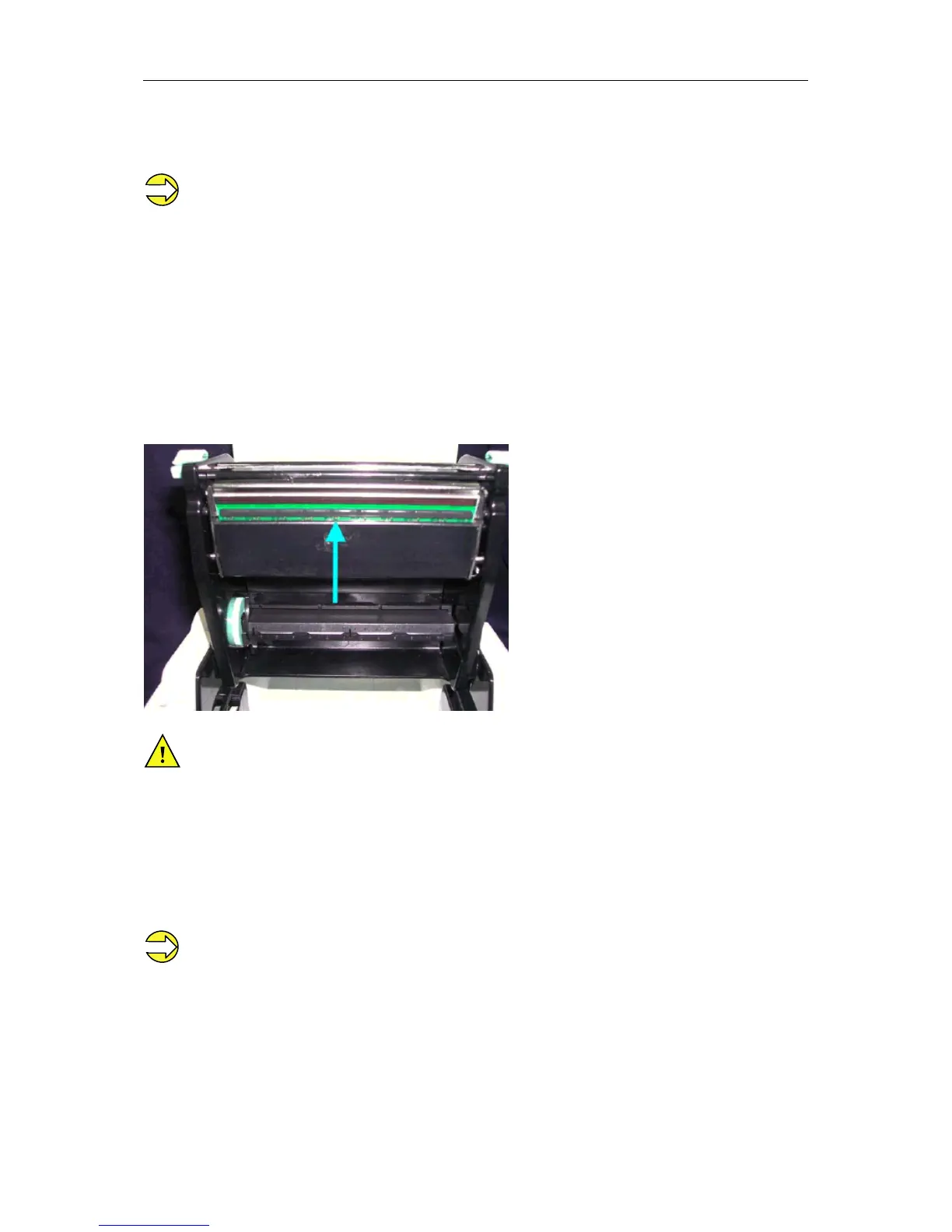
Open printhead by pressing the locking tenons.
Of on the printhead (see arrow) there is a label pieces or other stain, please use a soft cloth with
industrial use alcohol to wipe away the stain.
We recommend weekly cleaning of printhead.
Please clean printhead with the appropriate cleaning card.


 To Next Page