Manual
22
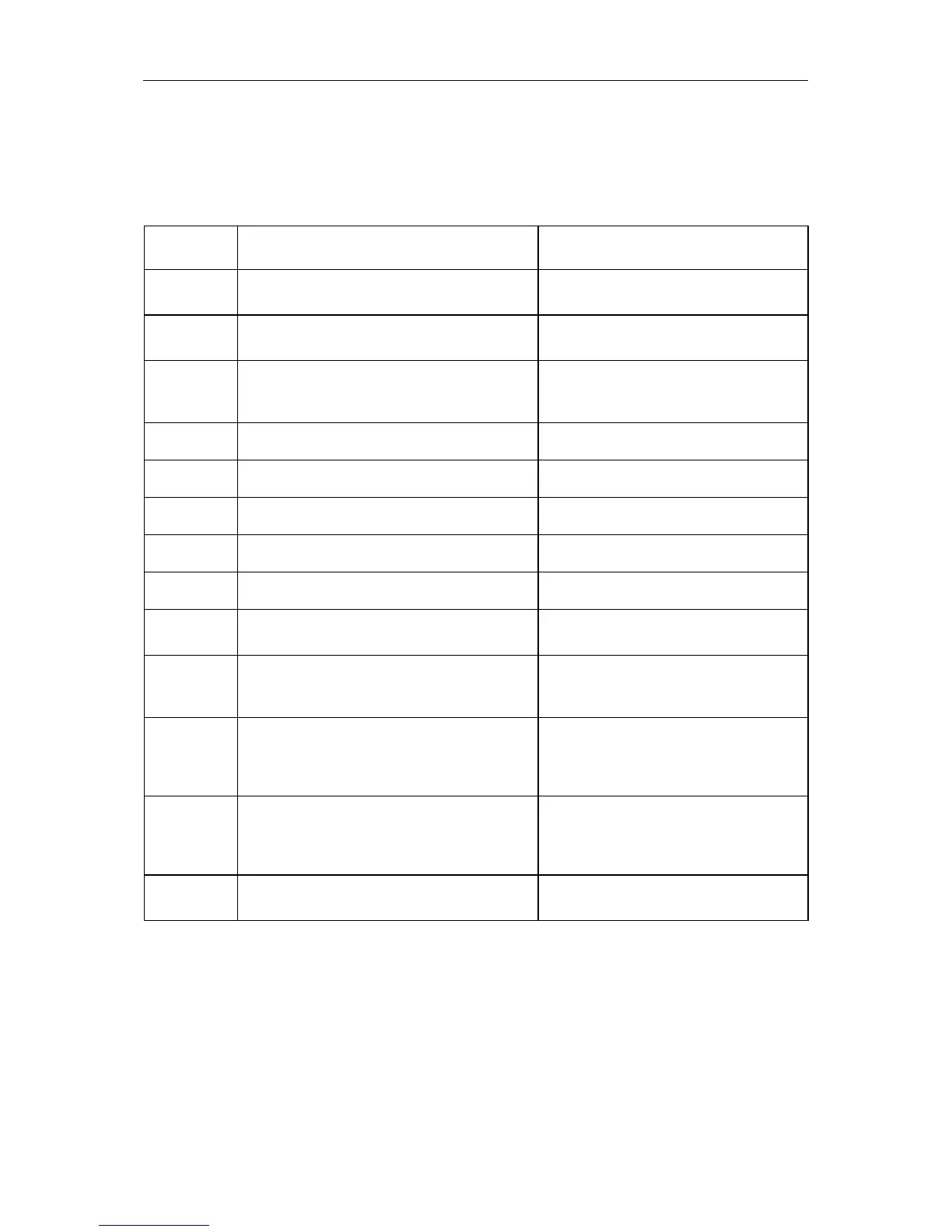
ERROR CORRECTION
Note: If the status LED is red, then the printer indicates an error. Press longer than 3 seconds to
the FEEd key and the error code (see table below) is printed.
Error no.
Possible causes Possible error correction
1
Line rises up completely or partly over the
upper edge of label.
Move line down (increase Y value).
Check rotation and font.
2
Line rises up completely or partly over the
bottom edge of label.
Move line up (decrease Y value)
Check rotation and font
3
One res. several characters of the text is
res. are not available in the selected font.
Change text.
Change font.
4 Selected code is not available. Check code type.
5 Selected position is not available. Check position.
6 Selected font is not available. Check font.
7 Selected font is not available. Check font.
8 Text cannot be fit in the selected field. Check field size.
9 While measuring no label was found.
Set label length is too large.
Restart measuring process.
Check label length.
10
During the print order the ribbon roll goes
empty.
Defect at the transfer ribbon photocell.
Change transfer ribbon.
Check transfer ribbon photocell
(Service Function).
11 Stop bit error. Check stop bits.
Check baudrate.
Check cable (printer and PC).
12 Parity error. Check parity.
Check baud rate.
Check cable (printer and PC).
13 Loss of data at serial interface (RS-232). Check baud rate.
Check cable (printer and PC).


 To Next Page