7
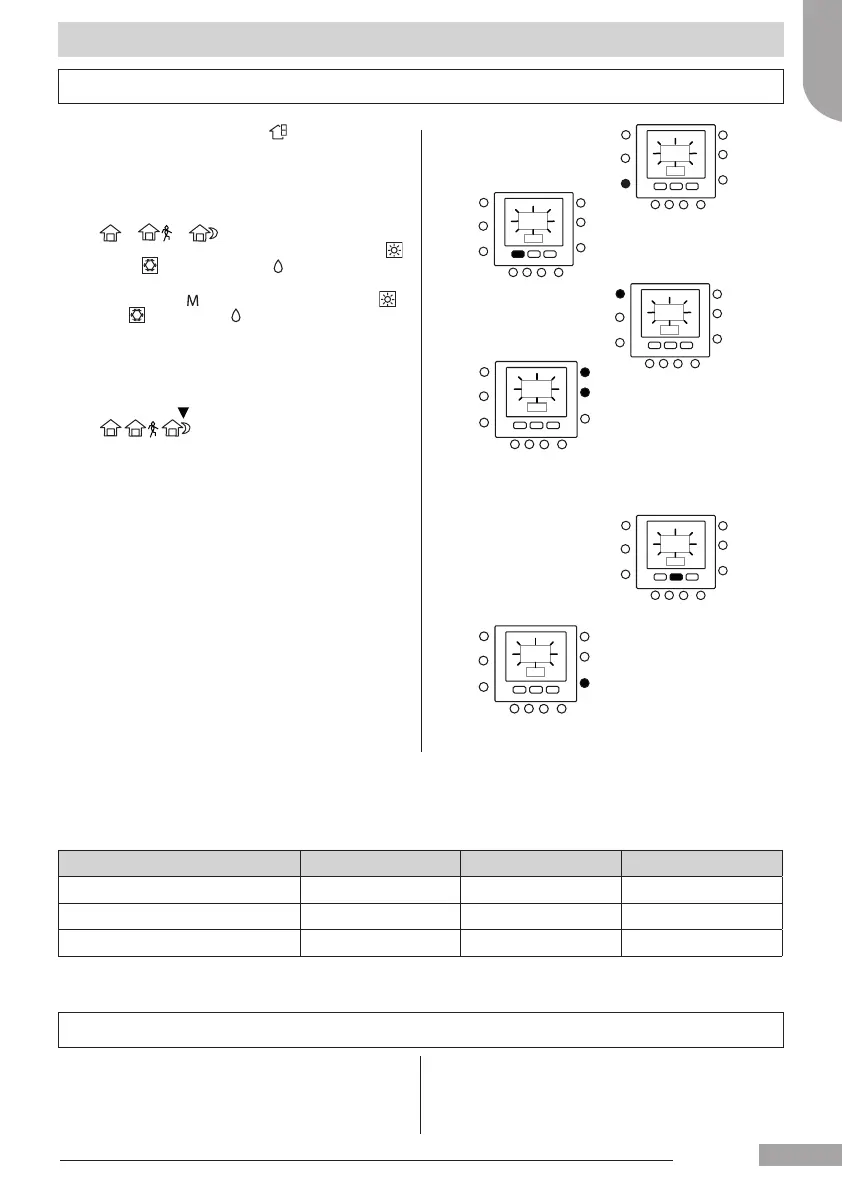
1. Select the desidered zone with key or virtual zoning
function.
2 Press and hold the comfort button
(
or or ) to be changed for about ve
seconds. The set temperature, and the symbol heat (
)
or cool (
) or domestic water ( ) will ash.
3 Press the mode (
) button to switch between heat ( ),
cool (
) and sanitary ( ) (depend on access level).
4 Press the up or down button to set the desired
temperature set point for the selected mode. The
triangle icon (
) above the pressed comfort button
(
) will start ashing.
5 Press again the up or down button to set the new
desired temperature setting for the next setting.
6 Pressing one of the other "home", "sleep", "away"
button, and replay step 4 to 5.
7 Press OK button to conrm changes and to exit from
the Comfort change mode.
8 If needed select a dierent zone and repeat steps 1.
Programming the user interface
"Home" "sleep" "away" settings
The factory setting are show above
Touch ‘N’ Go Option Heat Cool Domestic hot water
Home 20° C 24° C 60° C
Away 15° C 28° C 50° C
Sleep 18° C 26° C Not available
Schedule settings
The schedule works on 4 dierent periods, called P1, P2, P3,
P4. Each zone has its own schedule. Using master board is
possible to set the schedule for sanitary and system.
The thermostat has preset settings (see below), but you can
change these.
Using the "virtual zone" feature (only for access level 3 and
master board) , it's possible to change the schedules of all
the zones in the installation.
English
129H84_GB_8.indd 7 23/07/12 16.29






 To Next Page