49
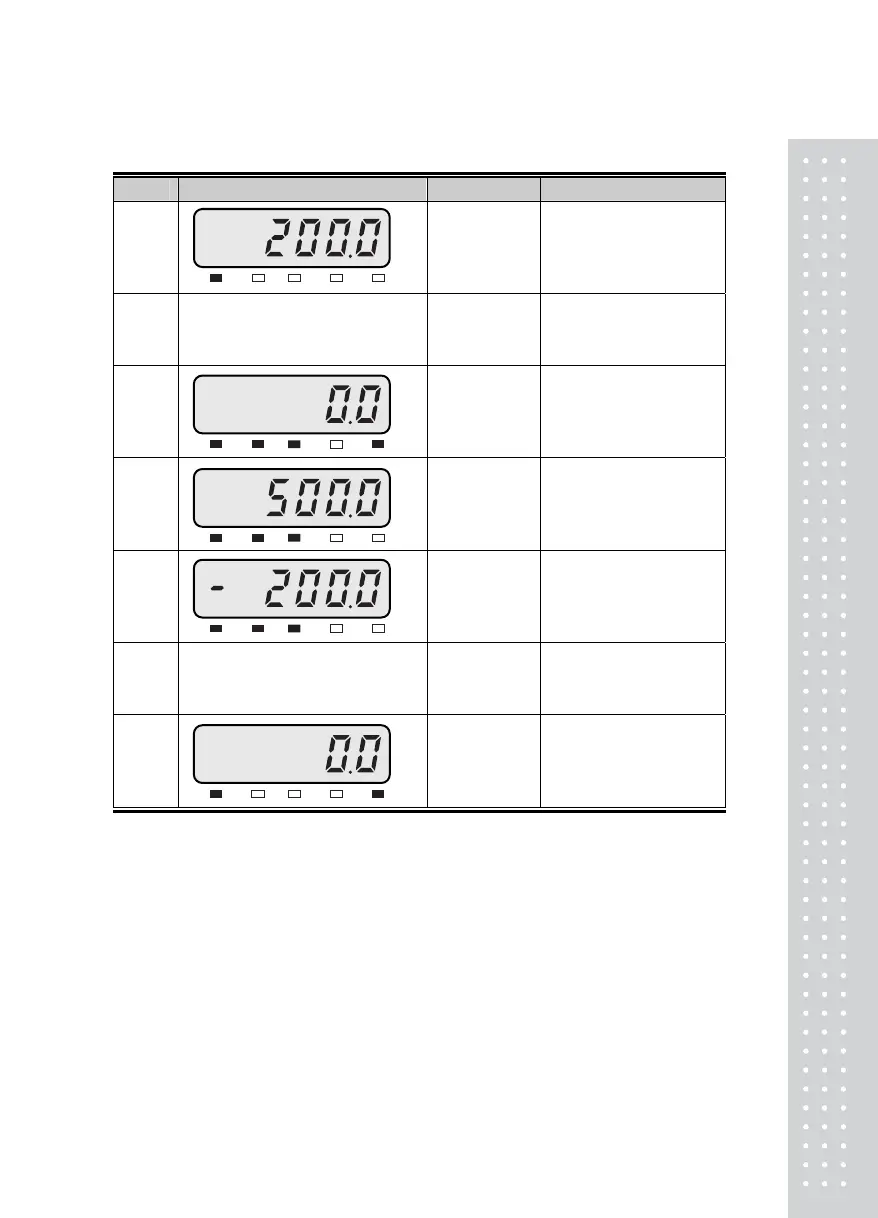
■ Example 2. Tare Function Usage
Display & Key On platform Description
Step 1
Container Tare weight: 200kg
Step 2
☞ TARE
Container
Store current weight as
the tare weight.
Step 3
Container
To be turned on tare
lamp means that tare is
registered in.
Net weight is on the
display.
Step 4
Container+
Content
Gross: 700kg
Net: 500kg
TARE and NET key is
turned on.
Step 5
Unload
Gross: 0.0kg
Net: -200.0kg
Tare function is turned
on.
Step 6
☞ TARE
Unload
If you press TARE key in
unload condition, tare
setting is released.
Step 7
Unload
Gross: 0.0kg
Net: 0.0kg
Tare function is turned
off.
► Note. TARE Range <‗ maximum capacity.
Press TARE key when the weight is stable.
※If you press TARE key in unload condition, tare setting is released.
ST TARENET HOLD ZERO
kg
ST TARENET HOLD ZERO
kg
ST TARENET HOLD ZERO
kg
ST TARENET HOLD ZERO
kg
ST TARENET HOLD ZERO
kg



 To Next Page