EN-25
Dual Time
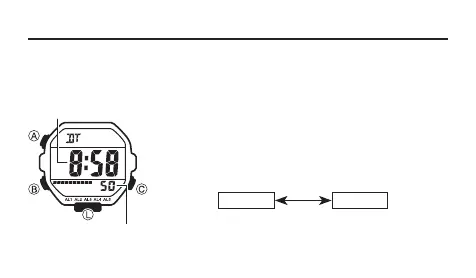
The Dual Time Mode lets you keep track of time in a different time zone.
• In the Dual Time Mode, the seconds count is synchronized with the seconds
count of the Timekeeping Mode.
To set the Dual Time
1. Press B to enter the Dual Time Mode (page EN-8).
2. In the Dual Time Mode, hold down A until the hour
setting starts to flash, which indicates the setting
screen.
3. Press B to change the selection in the following
sequence.
B
Hour Minutes
4. Press C to increase the setting.
5. Press A to exit the setting screen.
Seconds
Hour : Minutes



 To Next Page