23
Snapshot Tutorial
Snapshot Tutorial
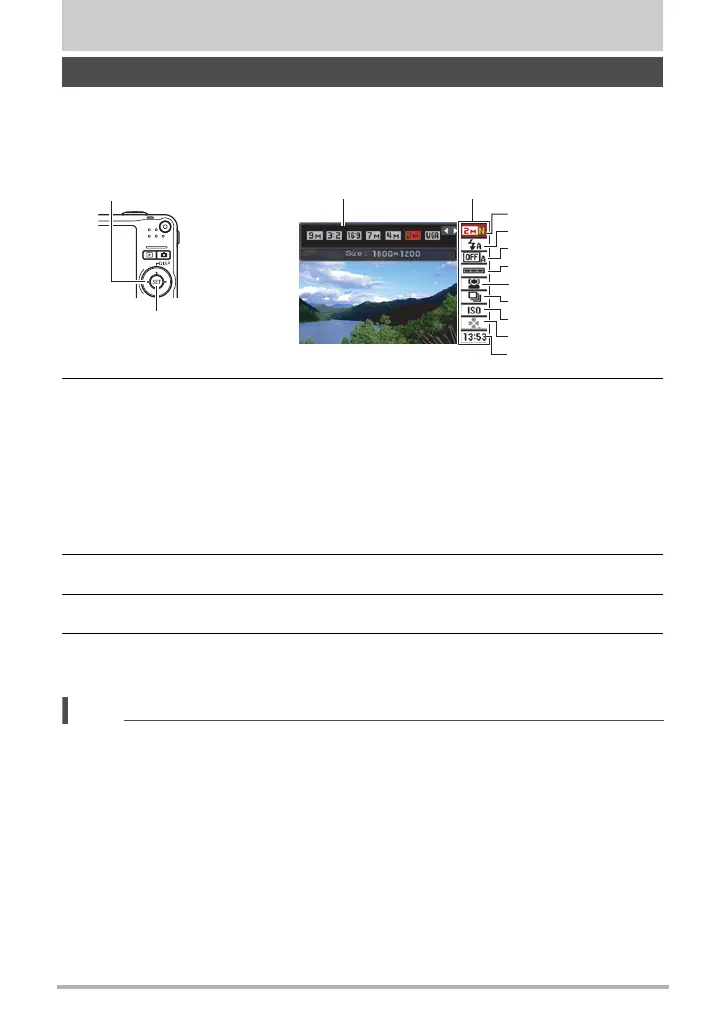
The Control Panel can be used to configure camera settings.
1. In the REC mode, press [SET].
This will select one of the Control Panel icons and display its settings.
2. Use [8] and [2] to select the setting you want to change.
* Image quality cannot be changed using the Control Panel.
3. Use [4] and [6] to change the setting.
4. If you want to configure another setting, repeat steps 2 and 3.
5. After all of the settings are the way you want, press [SET].
This will apply the settings and return to the REC mode.
NOTE
• You can configure the camera to turn off display of the Control Panel when you
press [SET] (page 120).
• You also can configure settings other than those listed above (page 57).
• The Control Panel cannot be displayed while a Prerecord Movie, For YouTube, or
Voice Recording Operation is in progress.
Using the Control Panel
1
9
5
3
4
7
8
2
6
[SET]
Control Panel
Available settings
[8] [2] [4] [6]
1
Image size/Quality* (pages 24, 69)
2
Flash (page 26)
3
Auto Shutter (page 28)
4
Auto Shutter trigger sensitivity
(page 30)
5
Face recognition (page 32)
6
Continuous shutter (page 37)
7
ISO sensitivity (page 39)
8
easy Mode (page 65)
9
Date/Time (page 42)

 To Next Page
 Loading...