17
Please follow the instruction in the manual in order to keep the amplifier work in its best state. If wrongly
operated and you thought that would be troubles please check according to following tips to look for the exact
reasons.
Troubleshooting
NOTE: is the registered trademark of Zhuhai Spark Electronic Equipment Co., Ltd.
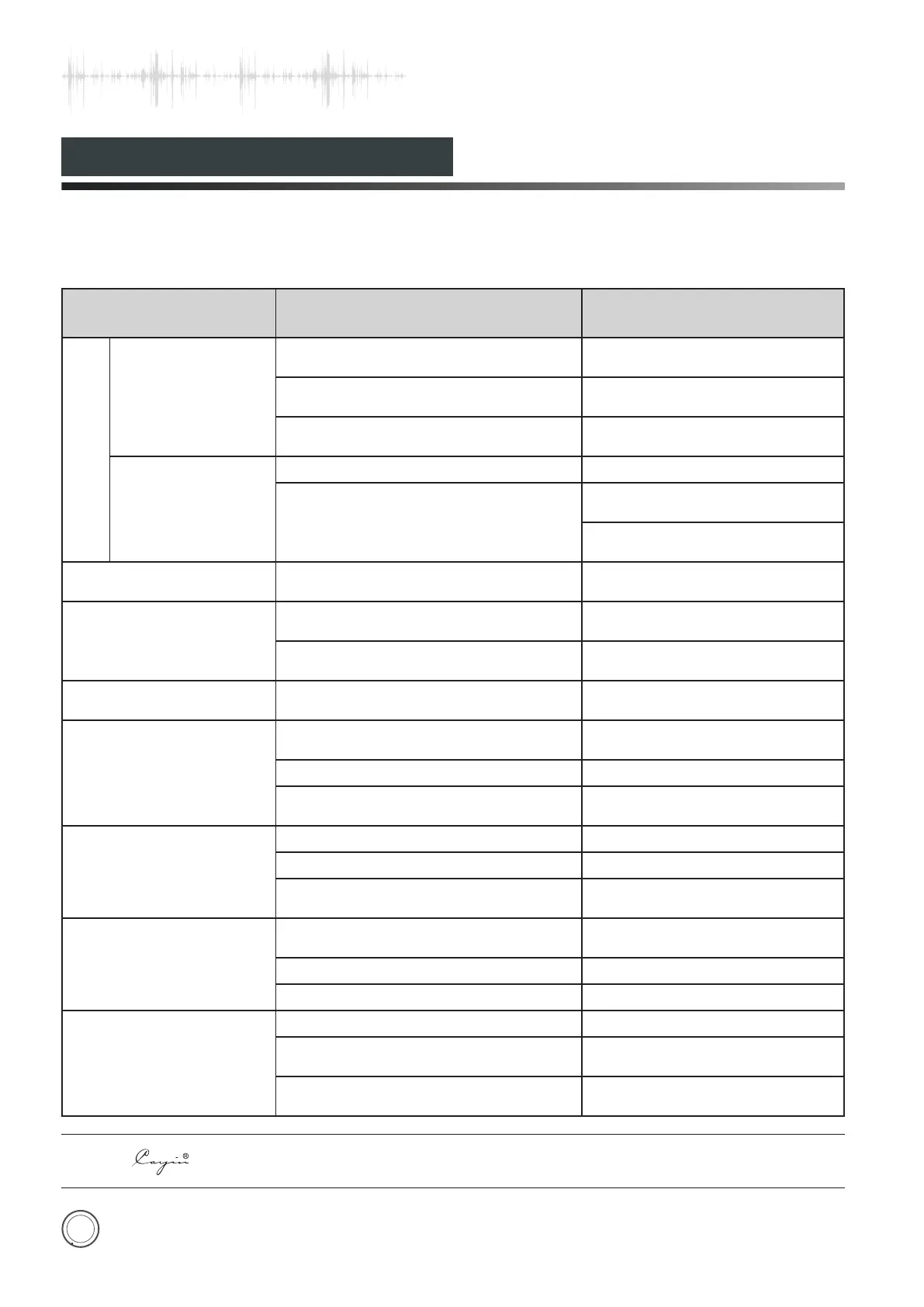
Problem
Cause
Remedy
NO OUTPUT
Power Indicator is
OFF.
Power cord is not well-connected.
Check power cable connection or
power outlet connection
Main fuse is out.
Replace with the same type
and value fuse.
Troubles of inner parts or components.
Please contact with local
agents or our company.
Power Indicator is
ON.
Volume is at ZERO.
Turn up the Volume.
NO signal input.
Check the function of the
sound source.
Check the input selection and
switch to the proper input.
Sound Distortion
High input signal level.
Turn down the volume to
suitable position.
Noise output
Ground of input signal cable is open
or bad contact of the input signal cable.
Replace the input signal
cable with a new one.
Components or circuits are in trouble.
Please contact with local
agents or our company.
Sound field Positioning
is not so good.
Signal input cables or speaker
cables are wrongly connected.
Reconnect it as suggested in
the manual.
Malfunction of Remote
Control
Be disturbed.
Keep away from the source of
disturbance. Turn off and restore.
Low Battery. Replace with new batteries.
Obstacles between the amplifier and
remote.
Remove the obstacles.
Can't lock the USB signal
USB cable is not well connected. Connect the USB cable well
USB Audio Device has not been set. Set USB Audio Device
No USB data
Keep the Media Player in working
state
Computer can't recognize
the device
The USB line is not according to the
USB2.0 specification
Replace the USB line
USB driver has not been installed Install the USB driver
USB driver error Restart the computer
The sound is abnormal
when the input status is USB
USB socket error Choose another USB socket
Computer is too busy
Reduce the running application
program
The hardware resource of computer is
too low
Upgrade the computer if
necessary


 To Next Page