Operation system requirement
11
Install the USB Audio driver software first
before using the PC-DAC input. Please check as
following for the procedures.
1.Connect the amplifier and computer with USB
cable.
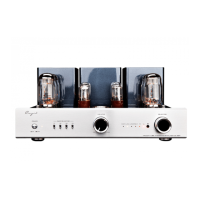
2.Put the driver CD into your computer and open
the files. Double-click “ ”to run the diver
installer. As below:
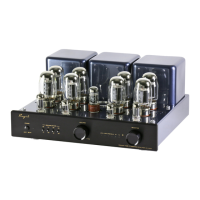
3. Click“Next”to choose the installation
location.
Computer should meet the following requirements if you are going to use USB audio:
1.Hardware requirement:
◆ Intel or AMD CPU with 1.2GHz or higher processing speed.
◆ Higher than 512MB system RAM.
◆ High speed USB 2.0 socket.
2.Operation system requirement:
◆ Windows system: Microsoft Windows XP、Windows Vista , Windows 7® and Windows 8®
◆ Mac OS X system: Apply OS X (10.6.3 or above)
◆ Other system: No support for Linux system or others.
3.Suggested Media player:
◆ Windows system: Foobar 2000 media player (1.0 or above)
◆ Mac OS X: Audirvana media player
Installation of Driver Software


 To Next Page