45/60
using the key
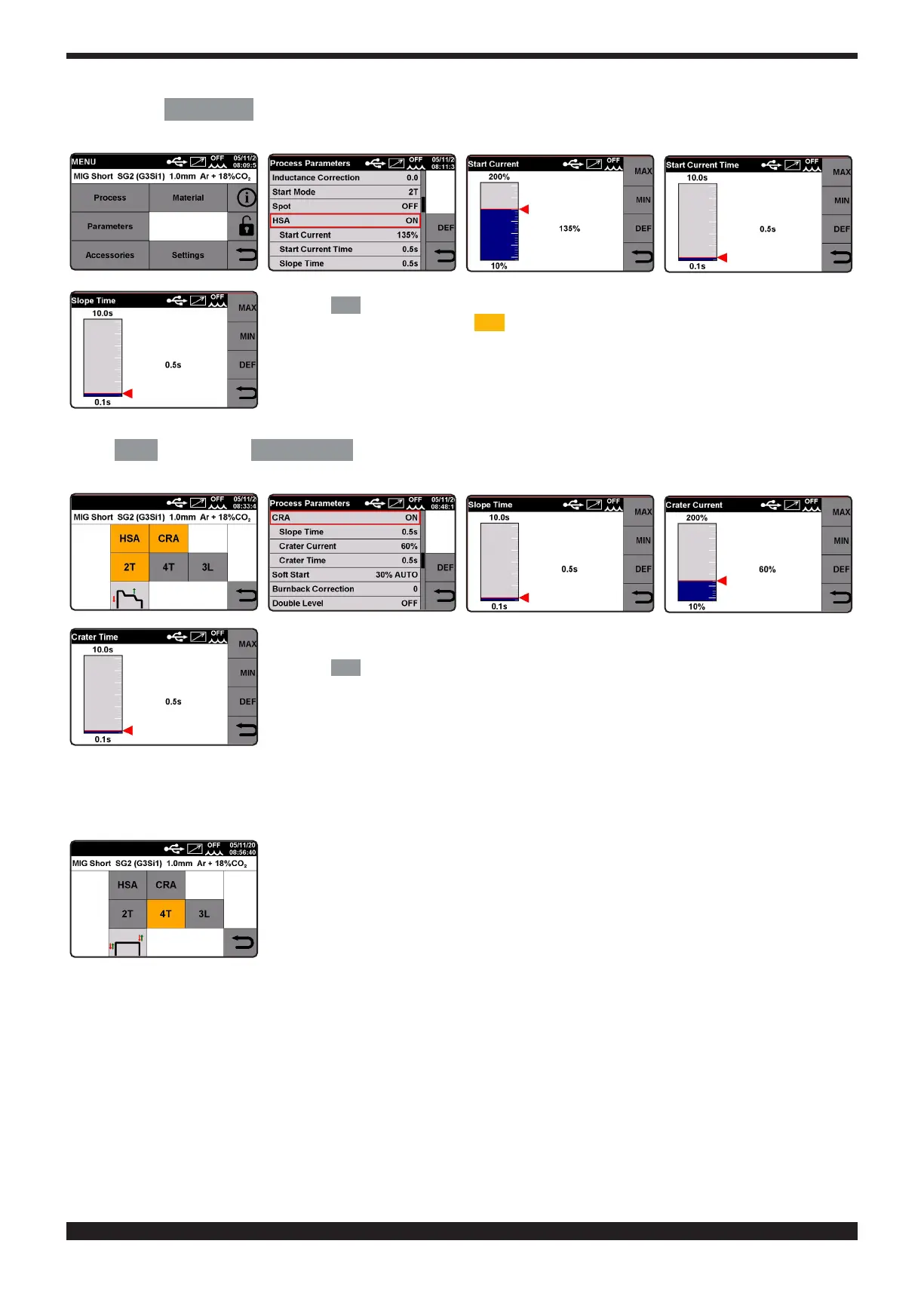
PARAMETERS
to enter the process parameters menu. Turn knob 2 to select the parameter, press it to
enter the adjustment screen and turn it to adjust the value.
Press the
DEF
key to restore factory settings.
After activating the parameter
CRA
, the operator can adjust connection time between
the welding current and the crater lling current from 0.1 to 10 seconds.
The operator can also adjust the crater lling current from 10 to 200% of the welding
current.
The duration of this current can also be adjusted from 0.1 to 10 seconds of the crater
lling time.
To adjust connection time, crater lling current and crater lling time values, enter the main menu by selecting
key F
MENU
and use key
PARAMETERS
to enter the process parameters menu.
Turn knob 2 to select the parameter, press it to enter the adjustment screen and turn it to adjust the value.
Press the
DEF
key to restore factory settings.
Mode 4T�
To begin welding, press and release the torch trigger; to stop welding press and release it again. Together with Mode
4T you can also select function HSA (automatic hot start) and function CRA (nal crater lling). (See Mode 2T).
Mode 3L�
Particularly recommended for welding aluminium. The HSA and CRA functions are inhibited when mode 3L is activa-
ted. Three welding currents can be selected using the torch trigger. The current and the connection time values are
set as follows:
Start Current. Adjustable from 10 to 200% of set welding current.
Connection Time. Adjustable from 0.1 to 10 seconds. Denes the connection time between start current and wel-
ding current and between welding current and crater lling current (crater lling when welding is complete).







 To Next Page