54/60
G
JOB
Job Menu�
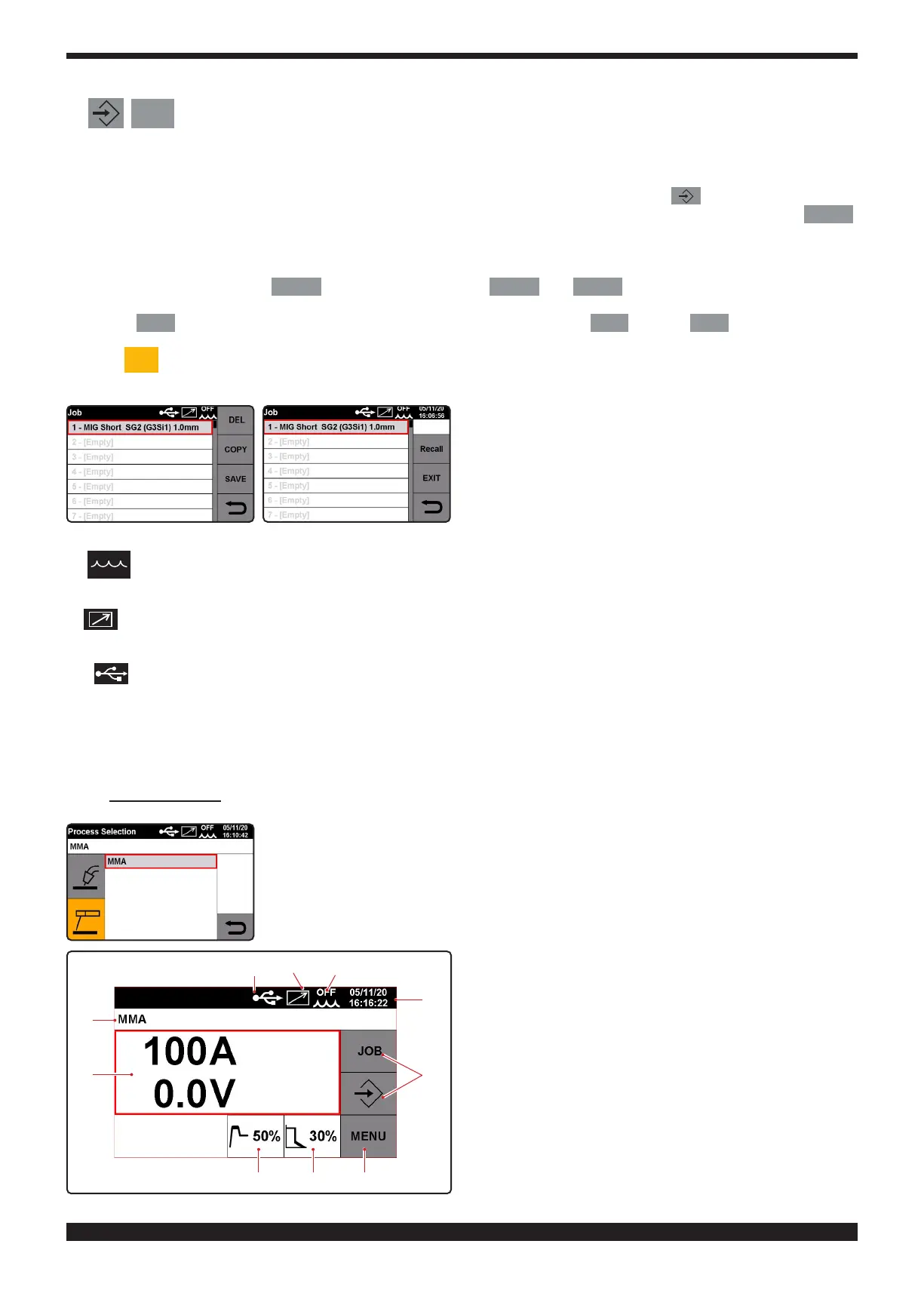
In this section you can save, call up, restore, copy or cancel the working programs.
Saving a "JOB" program.
After nding the ideal welding condition to be saved, press key, the scre-
en displays the rst available job number; to conrm the selection press key
SAVE
.
The saved string shows the process, the type and the diameter of the wire.
Before saving the working program, you can select a number to save it under by simply turning knob 2 to the selected
number.
The job screen shows the key
SAVE
and two additional keys
COPY
and
DEL
. Press the rst button to copy and
save any job program and save it again under another number. Use the "del" button to delete any saved job program.
Press key
JOB
to open a screen with all the saved job programs. Press key
RIC
and key
OK
to call up any pro-
gram from the memory and modify it.
The key
JOB
1
with the selected program number is displayed on the main screen; turn knob 2 to recall all the saved
job programs one by one in order to modify them.
H
Presence of accessory, cooling unit
L
Presence of accessory, push-pull torch
(optional)
M
Presence of USB key in connector 6
N
Date and Time.
6�2 MMA Process
A
B C F
G
H
O
N
M L







 To Next Page