44/60
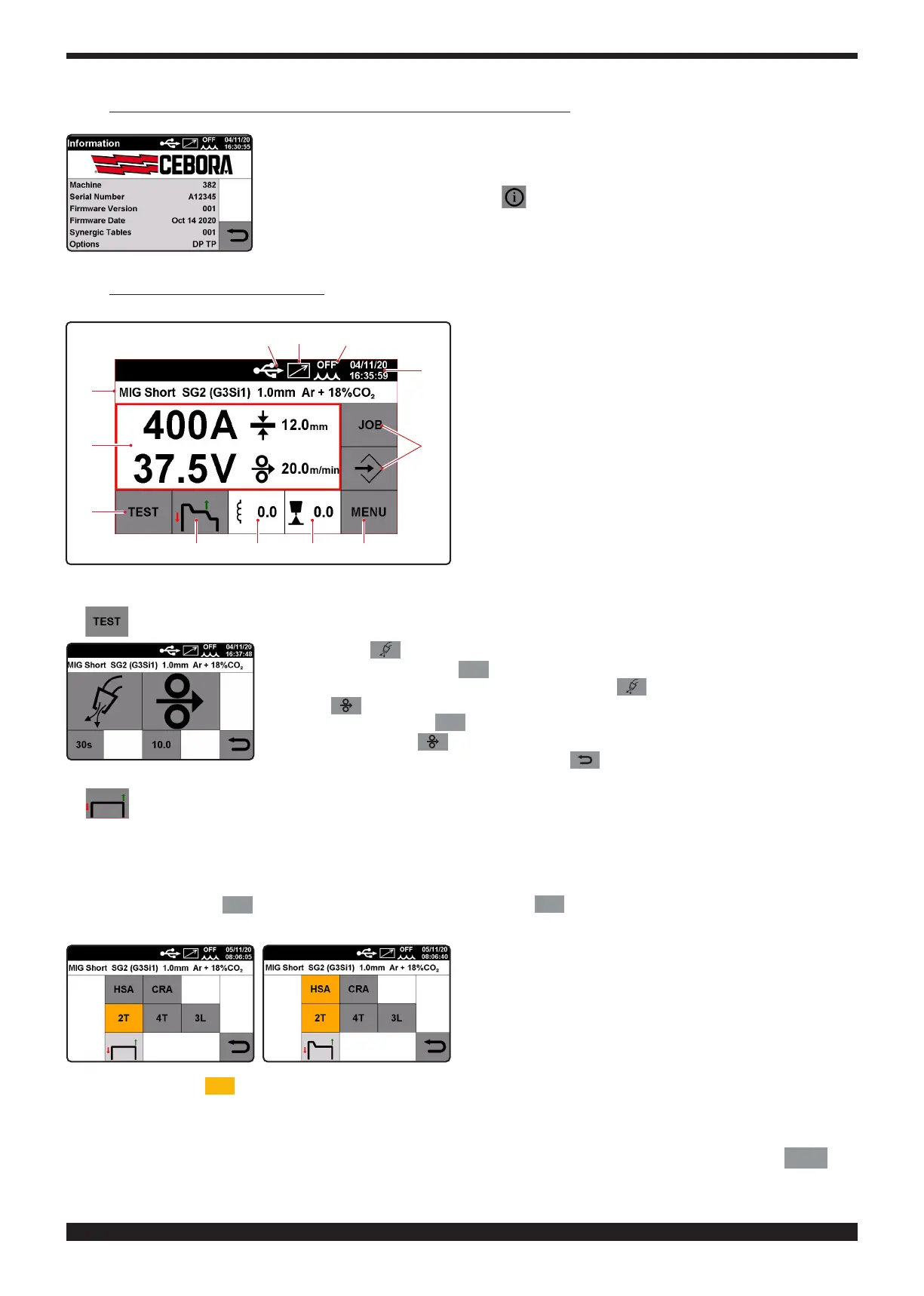
6 DESCRIPTION OF TOUCH SCREEN DISPLAY FUNCTIONS
When the machine is switched on, for a few moments the display shows: the machine item
number, the serial number, the rmware version, the rmware development date and the rele-
ase number of the synergic curve table and power source options.
This information is also given in menu .
6�1 MIG Process� Main screen
A
B
C D E F
G
N
O
M L H
A
The screen displays the welding current in amps, wel-
ding voltage in volts, the suggested thickness in mm
and the welding wire speed in m/min. During welding the
display shows continuous current and voltage values and,
once welding is completed, the last value in amps and volts
is displayed together with the message HOLD. When the
display shows the HOLD parameters, they are BLUE. When
in HOLD mode, press the middle of the display to open a
screen showing the main parameters of the latest welding
job: arc on time in seconds, main current time in seconds,
average current in amps, average voltage in volts and total
energy in Kj.
Amp and volt parameters are synergically adjusted by me-
ans of knob 2.
B
To carry out the gas test and the wire test select the corresponding symbol.
When you press (test gas), gas emerges from the welding torch for a time period that
is adjusted by means of key
30
; the value is adjusted between 1 and 60 seconds by
means of knob 2. To stop gas release, press the key again.
Press key (wire test)and the wire will emerge from the torch at a rate that can be
adjusted by selecting key
8.0
and adjusting the value by means of knob 2, from 1 to 22
metres/minute, the key must be held down throughout the test.
To return to the previous menu, press the key .
C
Start Stop
To choose the welding start mode, 2T, 4T or 3L, select the corresponding symbol.
Mode 2T.
The machine begins welding when the torch trigger is pressed, and stops when released. With mode 2T, you can also
choose the parameter
HSA
(Automatic Hot Start) and the parameter
CRA
(Final Crater ller). The 2 parameters HSA
and CRA can be activated at the same time, or individually.
Once the parameter
HSA
has been enabled, the operator can adjust the start current from 10 to 200% of the welding
current.
Current time can also be adjusted from 0.1 to 10 seconds. Connection time between the start current and the
welding current can also be adjusted from 0.1 to 10 seconds.
To adjust start current values, current time and connection time, enter main menu by selecting key F
MENU
and







 To Next Page