20
Methods
Methods
Classic methods are created by the user and intended for use with synthetic chemistry applications.
Create a Classic Method
Creation of a method requires training and knowledge. Contact CEM Corporation before creating a method. See
“Operating Parameters” section for details when selecting parameters.
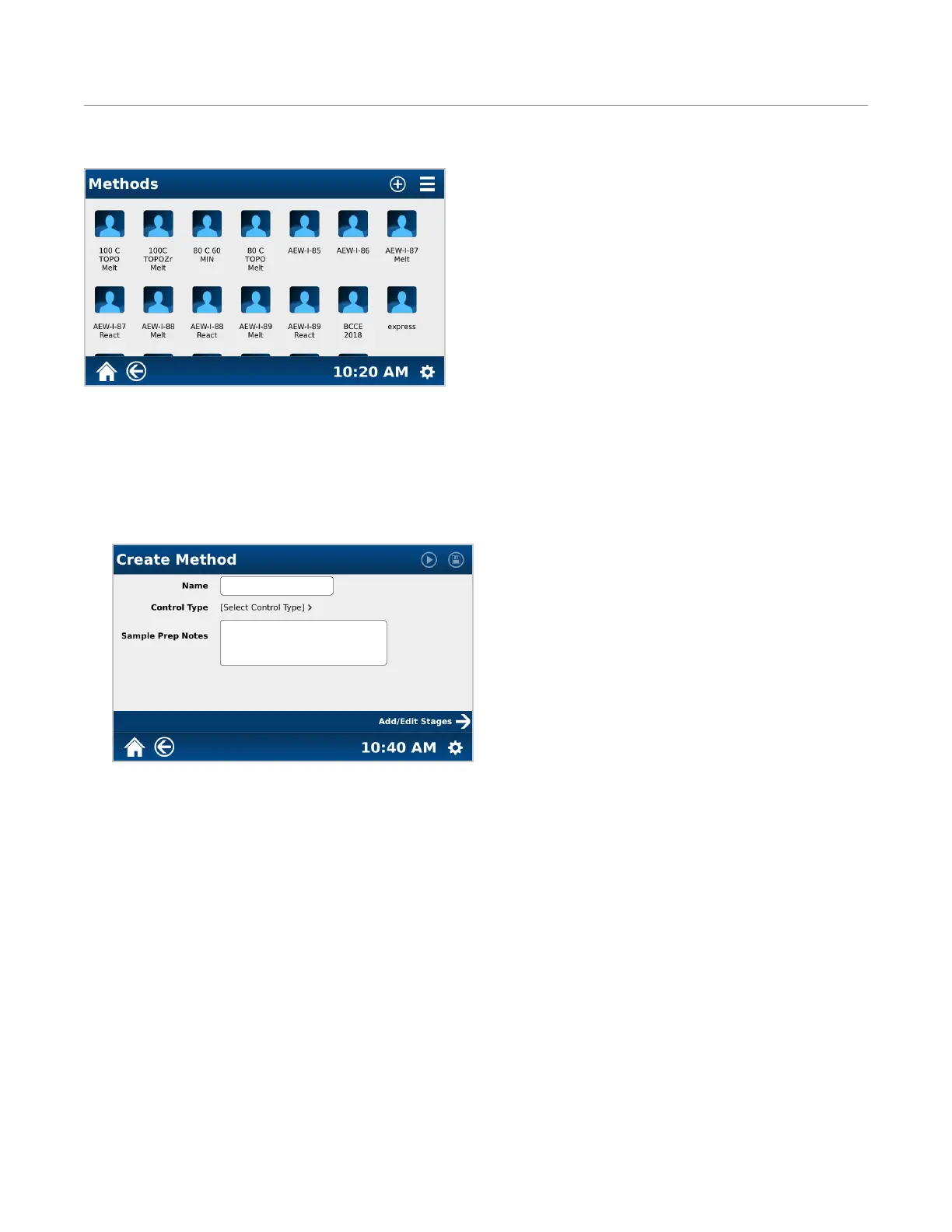
1. From the MARS 6 home screen, select “Classic Methods.”
2. Select “+” icon at the top of the screen to begin creating a Classic Method.
3. Select “Method Name” and enter in a name.
4. Select “Control Type” and select the control type. “Ramp to Temperature” is recommended for synthetic reac-
tions.
5. Once the control type is selected, the “Vessel Type” option will appear. Touch and scroll the vessel choices to
choose the desired vessel to be used with this method: GlassChem, EasyPrep, EasyPrep Plus, or Beaker.
6. If applicable, select “On” for duotemp. Duotemp is only available for EasyPrep and EasyPrep Plus vessels.
7. If desired, select “Sample Notes” and enter in note.
8. Select “Add/Edit Stages->” to enter method parameters based on the control type selected for the method.


 To Next Page