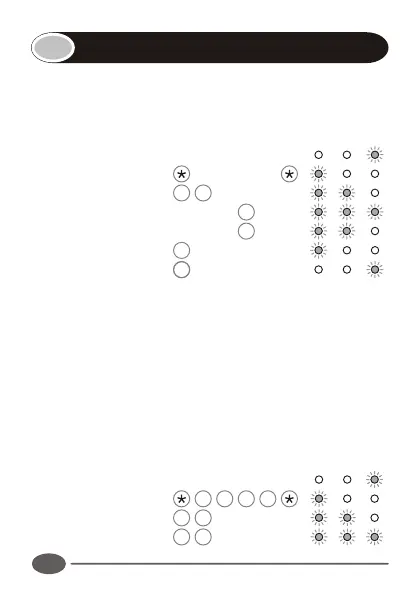
Sets the output pulse time of the output channels. Default
setting is 1 second pulse.
Enter the following keystrokes:
1. Enter Program mode Master Code
2. Select Output menu 3 #
3. Enter Output channel Channel #
4. Enter pulse time Seconds # †
5. Exit Output menu #
6. Exit Program mode #
† Repeat step 3 & 4 for additional channels.
Notes:
!
A pulse time of 0 seconds will give a latched output.
!
Maximum pulse time is 255 seconds.
Example:
Set Output 1 to a 1 second pulsed output.
(Master code = 1234)
Enter Program mode 1 2 3 4
Select Output menu 3 #
Enter Output channel 1 #
3
10
Setting the output timers
INDICATOR LED's
INDICATOR LED's


 To Next Page