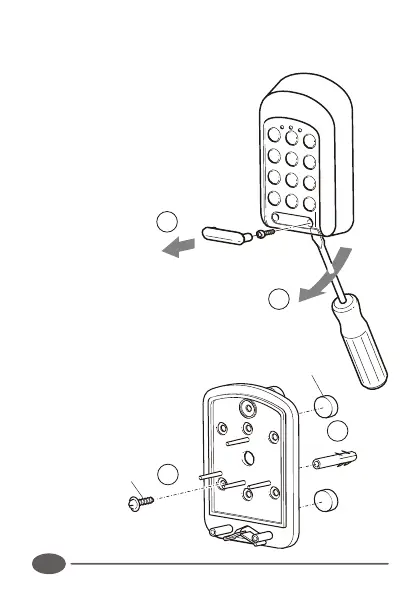
1. Remove retaining screw cover and
screws.
2. Insert screwdriver blade into groove
provided between the cover and
back panel. Lever screwdriver
forward to separate cover and back
panel.
3. Fix the self adhesive rubber pads
into the recesses provided on the
rear panel.
4. Attach the rear panel to the
mounting surface/gooseneck with
the supplied mounting screws
provided. Be sure to seal
all mountings with silicone
sealant.
3
4
SELF ADHESIVE
RUBBER PADS
MOUNTING
SCREW
22
Typical Mounting Instructions:
2
1


 To Next Page