6
Adding a new user
1
Adds a new access code at a specified address, assigns
which outputs the code must activate, and how many
accesses are allowed before the code becomes invalid.
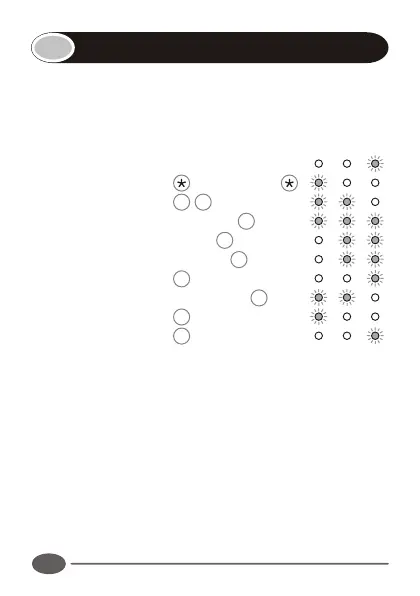
Enter the following keystrokes:
1. Enter Program mode Master Code
2. Select Add menu 1 #
3. Enter user address Address #
4. Enter access code Code #
5. Select outputs [Output] # †
6. Assign outputs #
7. Enter access limit [Accesses] # ‡
8. Exit Add menu #
9. Exit Program mode #
† Repeat step 5 for additional outputs.
‡ Repeat steps 3 - 7 for additional users.
Notes:
!
If no output is specified, the relay output is selected.
!
If the number of access are not specified in step 7, unlimited
access is set. Care must be taken to ensure the desired access
limit is correctly applied. NB: If unlimited accesses are required,
only enter # at step 7.
Example:
Add access code 527 into address 10. Code must operate
INDICATOR LED's



 To Next Page