5
Changing the Master Code
Replaces the default or currently stored master code with a new
master code. The master code may also be learned by
following the procedure on page 6, Adding a New User.
Notes:
!
The master code must always be stored at address 0.
!
The master code can be used as a normal access code.
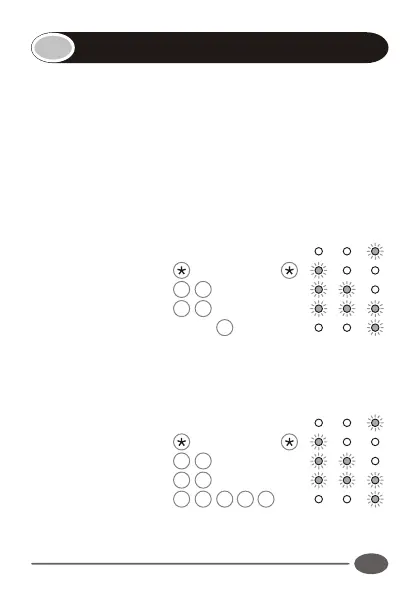
Enter the following keystrokes:
1. Enter Program mode Master Code
2. Select KwikLearn 0#
3. Enter address 0 #
4. Enter new code Code #
Example:
Replace the default master code 1234 with a new master code,
3781
1. Enter Program mode Master Code
2. Select KwikLearn 0#
3. Enter address 0 #
4. Enter new code
INDICATOR LED's
INDICATOR LED's
3
7
8
1
#


 To Next Page